


A UV printer lets you print bright pictures and words on many surfaces. It uses ultraviolet light to dry the ink right away. This makes your designs dry fast and look clear. You get great speed, strong prints, and lots of ways to use it. You can use it for packaging, signs, clothes, or electronics.
Many businesses use UV printers all over the world. Here is a quick look at where you might see them:
Region | Key Industries Utilizing UV Printers |
|---|---|
North America | Manufacturing, Advertising, Packaging, Décor |
Europe | Automotive, Electronics, Packaging, Textiles, Promotional Items |
Asia-Pacific | Manufacturing, Packaging, Consumer Electronics, Automotive |
Latin America | Packaging, Automotive, Food Packaging, Textiles |
Middle East & Africa | Retail, Advertising, Manufacturing |
You can trust a UV printer to make clear prints on wood, glass, fabric, or even metal.
UV printers use ultraviolet light to dry ink right away. This makes prints look sharp and bright on many things.
They can print on hard things like wood, glass, metal, and acrylic. They also print on soft things like vinyl and fabric.
Piezo print heads in UV printers make prints that are clear and detailed. They use less ink and last longer.
UV printing is quick and good for the environment. The prints last a long time and do not fade, scratch, or get ruined by water.
There are different kinds of UV printers. Flatbed printers work for hard things. Roll-to-roll printers work for soft things. Hybrid printers can do both.
Desktop UV printers are easy to use and not too expensive. They help you start printing custom designs at home or in small shops.
UV printers let you add special touches to many items. This helps businesses make cool products and gifts fast.
If you take care of your UV printer and use the right supplies, it will work well and last longer.
A UV Printer has a special feature called UV light curing. This makes the ink dry and stick in a new way.
Old printers need a long time for ink to dry. Sometimes, you wait hours or more. With a UV Printer, you do not wait. The UV light makes the ink hard in seconds. The light starts a reaction in the ink. The ink changes from liquid to solid very fast. You can touch your prints right away. This helps you finish your work faster and start new projects soon.
UV curing is so fast that you can print, touch, and stack items without smears or wet ink.
Some printers use heat to dry ink. Heat can hurt things like thin plastic or special film. A UV Printer uses light instead of heat. This means you can print on things that do not like heat. LED-UV curing uses less energy and lasts longer. This is good for the earth and saves you money.
Scientists say UV light starts a reaction in the ink. The ink has chemicals that get hard when they meet UV light. This is called polymerization. It keeps the ink from spreading and makes sharp pictures. No heat means your things do not bend or get ruined. UV curing also makes less smell and fewer bad chemicals. This keeps your work area safer.
The print head is the most important part of a UV Printer. Most UV printers use piezo print heads. These are not the same as thermal print heads.
Piezo print heads have tiny crystals. When you use electricity, the crystals change shape. This pushes out small drops of ink with control. You get sharp lines, smooth colors, and lots of detail. The print head does not heat the ink. This stops color changes and lets you use more kinds of ink.
Here is a quick comparison between piezo and thermal print heads:
Feature/Specification | Piezoelectric Print Heads | Thermal Print Heads |
|---|---|---|
Operating Principle | Mechanical deformation of crystals at room temperature | Rapid heating to create bubbles that eject ink |
Ink Heating | No heating, operates at room temperature | Heats ink to ~400°C to form bubbles |
Print Head Lifespan | Long lifespan, rarely needs replacement | Short lifespan, disposable print heads |
Ink Consumption | Low (10-12 mL per square meter) | High (about double piezo) |
Print Resolution | Up to 2880 dpi | Up to 1200 dpi |
Ink Compatibility | Wide range including organic and particle inks | Limited, heat-sensitive inks prone to color shifts |
Color Fidelity | True ink color, cooler tones due to no heat | Color shifts warmer due to heat-induced reactions |
Clogging and Maintenance | Reduced clogging, maintenance components protect nozzles | More prone to clogging and print head burn out |
Power Consumption | Lower, no heating required | Higher due to heating element |
Print Head Replacement | Requires disassembly for replacement | Quick-release design for easy user replacement |
Reliability and Stability | High stability, low failure rate | Lower reliability, prone to sudden failures |
Piezo print heads last longer and use less ink. They give you better prints. You save money because you do not change print heads often.
A UV Printer can use color ink and white ink. This gives you more ways to make designs.
White ink makes a solid base. Colors look bright on dark or clear things.
You can print on glass, wood, metal, or black plastic and still get bright colors.
White ink lets you add highlights, special effects, and raised or shiny spots.
You can make prints with glitter, metallic, or shiny looks.
Printing with white ink helps your designs stand out on any material.
A UV Printer uses a digital inkjet process to print on almost anything. Here is how it works:
Pick your material and set up your design on the computer.
The printer holds your item so it does not move.
The piezo print head moves and sprays tiny ink drops where needed.
The UV LED lights dry the ink right away. Your print is dry as soon as it comes out.
The printer’s rails and sensors keep everything lined up. You get sharp, clear prints every time.
This process gives you bright colors and strong prints that last. The ink sticks well to many things. The fast drying means no smudges and no waiting for prints to dry.
With a UV Printer, you get fast, accurate, and flexible printing for almost any project.
When you look for UV printers, you will see a few main types. Each type is good for different jobs. The three most common are flatbed, roll-to-roll, and hybrid.
Flatbed UV printers are strong and reliable. You put your item on a flat table. The printer moves over it and puts ink on top. UV light dries the ink right away. Flatbed printers work best for hard or flat things. You can print on wood, glass, metal, acrylic, or phone cases. If you need to make signs or custom decorations, flatbed printers give you clear and tough prints.
Here are some reasons people like flatbed printers:
Print right on thick or odd-shaped things.
Can print on big items, up to 3200 mm by 2000 mm (about 10.5 feet by 6.5 feet).
Good for printing lots of signs or decorations fast.
Flatbed printers make sharp prints that last a long time. The ink does not smear or fade.
Roll-to-roll UV printers are best for soft or bendy materials. Instead of a flat table, you use a roll of material like vinyl, film, or fabric. The printer pulls the roll through and prints as it moves. This is great for banners, car wraps, wallpaper, or long prints.
Some things to know about roll-to-roll printers:
Print on rolls up to 3200 mm wide.
Can print long jobs without stopping.
Best for big banners, signs, or car wraps.
Shops use these printers when they need to make lots of big prints fast. They help you finish jobs quickly and meet deadlines.
Hybrid UV printers can print on both hard and soft materials. You do not need to switch machines. This makes them a smart pick if you want to do many kinds of jobs.
Here is why you might choose a hybrid printer:
Switch between flat sheets and rolls easily.
Print up to 2000 mm wide (about 6.5 feet).
Good for businesses that print on many surfaces.
A hybrid printer saves space and money. You do not need two machines. You can take more jobs and help more customers.
Printer Type | Technology & Print Process | Suitable Materials | Application & Scale | Size & Production Scale |
|---|---|---|---|---|
Flatbed UV Printer | Prints right on hard or flat things with UV light; strong and accurate | Hard or flat things (phone cases, metal, glass) | Signs, decorations, metal, phone cases; prints a lot | Big machines; used in factories or big shops |
Roll-to-Roll UV Printer | Prints on long, soft rolls; good for big jobs | Soft materials (film, banners, wallpaper) | Banners, car wraps, wallpaper; makes lots of prints | Big machines; prints long rolls fast |
Hybrid UV Printer | Can do both flatbed and roll-to-roll jobs; works for many things | Both hard and soft materials | For businesses that need to print on many things | Medium to big size; can do many jobs |
If you want a UV printer that does almost any job, a hybrid printer is a good choice. You can print on many things and help your business grow.
Have you ever wanted to print your own designs at home or in a small shop? Desktop UV printers make that possible. These compact machines fit right on your desk or workbench. You do not need a big space or a special room. You can start printing cool things almost anywhere.
Desktop UV printers work just like the bigger flatbed or hybrid printers. They use UV light to dry the ink instantly. You get sharp, colorful prints every time. The main difference is the size. Desktop models are smaller and lighter. You can move them around if you need to.
Here are some things you will like about desktop UV printers:
Easy to Use: You do not need special training. Most desktop models come with simple software. You can set up your design, load your item, and start printing in minutes.
Fits Small Spaces: These printers are perfect for home offices, small shops, or classrooms. You do not need a big workshop.
Prints on Many Things: You can print on phone cases, pens, golf balls, notebooks, and even small signs. Some models let you print on items up to 6 inches thick.
Affordable: Desktop UV printers cost less than big industrial machines. You can start a small business or hobby without spending a lot of money.
Low Maintenance: These printers do not need much care. You just clean the print head and check the ink. Most problems are easy to fix.
Tip: If you want to try custom printing for the first time, a desktop UV printer is a great way to start. You can learn fast and see results right away.
Let’s look at how desktop UV printers compare to bigger models:
Feature | Desktop UV Printer | Large UV Printer |
|---|---|---|
Size | Small, fits on a desk | Large, needs a workshop |
Print Area | Up to 12x18 inches | Up to 10x6 feet or more |
Price | Lower | Higher |
Best For | Small items, gifts | Signs, banners, big jobs |
Portability | Easy to move | Hard to move |
You can use a desktop UV printer for many projects. Make custom gifts, print logos on products, or create samples for customers. Many people use them for personalized phone cases, awards, or small promotional items. Some schools use them for art classes or STEM projects.
If you want to get creative and try new ideas, a desktop UV printer gives you the freedom to experiment. You do not need a big budget or a lot of space. Just plug it in, pick your design, and start printing. It’s that simple!
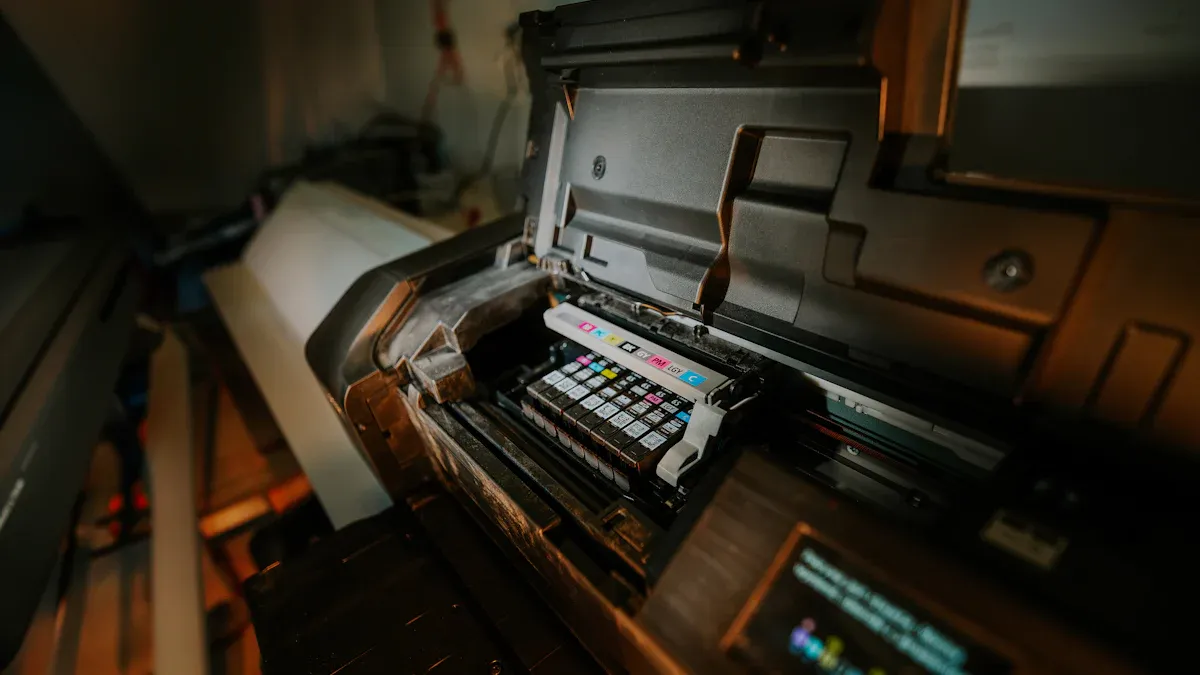
When you use a UV Printer, you can print on almost anything. This makes your projects stand out and gives you lots of creative options. Let’s look at the types of materials you can use.
You can print on hard, flat things with a UV Printer. These are called rigid surfaces. Here are some popular choices:
Wood is a favorite for custom signs, furniture, and art. You can print right on plywood, MDF, or hardwoods. The ink sticks well and shows off the natural grain. Your prints look unique and last a long time, even if you use them outside.
Glass printing lets you make cool signs, awards, or even glassware. You can print on clear or colored glass. White ink helps your designs pop, even on see-through surfaces. You can create frosted looks or bright, bold images.
Metal surfaces like aluminum or stainless steel work great for nameplates, medals, or gift boxes. The prints come out sharp and resist scratches and weather. You can use metal for both smooth and textured items.
Acrylic is perfect for signs, displays, and awards. The surface is smooth, so your prints look crisp and colorful. Acrylic prints are strong and last a long time.
Here’s a quick table to show you some common rigid materials and what you can make with them:
Material | Common Uses | Benefits |
|---|---|---|
Wood | Signs, furniture, art | Shows grain, moisture resistant |
Glass | Awards, panels, bottles | Transparent, scratch resistant |
Metal | Nameplates, medals, gift boxes | Durable, sharp prints |
Acrylic | Signs, displays, awards | Vibrant colors, crisp details |
Ceramics | Mugs, plates, tiles | Heat and wash resistant |
Plastic | Labels, packaging, banners | Weather resistant, flexible |
Tip: You can print on colored or clear materials. White ink makes your designs stand out, even on dark or see-through surfaces.
You can also print on soft, bendy materials. These are called flexible media. UV printing works well for these because the ink dries fast and sticks tight.
Vinyl is great for banners, stickers, and car wraps. The ink bonds right away, so your prints do not peel or fade. You can use them indoors or outdoors.
You can print on fabric for flags, soft signs, or custom clothes. The prints resist water and scratches. They stay bright, even after lots of use.
Paper is perfect for posters, packaging, and labels. UV printing gives you sharp images and bold colors. The ink dries instantly, so you can handle your prints right away.
Here’s how UV printing compares to other methods for flexible media:
Aspect | UV Printing | Vinyl Printing | Latex Inks |
|---|---|---|---|
Adhesion | Excellent | Good, but limited | Good |
Durability | Very high | Medium | High |
Flexibility | Less flexible | Flexible | Very flexible |
Eco Impact | Low VOCs | More waste | Eco-friendly |
You get strong, weatherproof prints with a UV Printer. The process is fast and easy, with no extra steps.
You can even print on 3D objects like phone cases, golf balls, or bottles. Printing on curved or bumpy surfaces can be tricky. Some UV printers use cameras and smart software to map the shape. This helps the printer line up the design just right. You get clear, even prints on almost any shape.
Printing on 3D items needs special care. The printer checks the surface and makes tiny adjustments.
You can print on glass, metal, plastic, ceramics, and more.
New technology helps fix errors and keeps your prints looking sharp.
Note: UV light cures the ink instantly, so your designs stay put—even on tricky shapes.
With a UV Printer, you can print on almost any surface you can imagine. Try wood, glass, metal, acrylic, vinyl, fabric, paper, or even 3D objects. White ink lets you print on dark or clear materials, making your designs pop every time.
You want your prints fast, right? A UV Printer helps you save time because it dries the ink instantly with ultraviolet light. You do not have to wait for hours like with old printers. As soon as your print comes out, you can touch it, stack it, or ship it. This instant curing means you can finish more jobs in less time.
Let’s compare print speeds:
Printer Type | Print Speed (High Quality) | Print Speed (Lower Pass) | Warm-up / Prep Time |
|---|---|---|---|
Mimaki UV (UJV) | ~10 min per foot (32 pass) | 8-10 min per foot (8 pass) | 3-7 min (prep/cleaning) |
HP Latex 700/800 | Faster than Mimaki UV | N/A | 6-7 min (warm-up) |
You might notice that some solvent and latex printers print faster. However, those printers need extra time for drying and finishing. With a UV Printer, you skip those steps. You can handle your prints right away, which helps you meet tight deadlines and take on more work.
Tip: Instant curing means you do not need extra coatings or lamination. You save time and money on every job.
A UV Printer gives you the freedom to print on almost anything. You can print on wood, metal, glass, acrylic, leather, plastic, and even fabric. You do not need special coatings for most materials. This makes your shop more flexible and lets you offer more products.
Here’s a quick look at what you can print on:
Material | UV Printing | DTG Printing | Sublimation Printing |
|---|---|---|---|
Acrylic Sheets | Yes | No | No |
Wood / MDF | Yes | No | No |
Ceramic Mugs | Yes | No | Yes |
Phone Cases | Yes | No | Yes (if coated) |
Leather Items | Yes | No | No |
Metal & Glass | Yes | No | Yes (if coated) |
You can make custom phone cases, signs, awards, home décor, and even industrial labels. Print shops love this because they can serve many industries and offer unique products. You can switch between jobs quickly and keep your customers happy.
Note: UV DTF printing lets you print on curved or uneven surfaces, like bottles or golf balls. You can create one-of-a-kind gifts and products.
You want your prints to last. UV printing gives you strong, long-lasting results. The ink bonds tightly to the surface, so your designs resist fading, scratches, and water. Labs test UV-printed materials for durability. They check for fading with UV light, scratch resistance, and water exposure. These tests show that UV prints hold up well in real life.
UV-printed graphics last 2 to 5 years outdoors, depending on the material and if you use lamination.
Without lamination, prints last at least 2 years before fading. With lamination, they can last up to 5 years.
UV prints resist scratches and water, so they work well for outdoor signs, labels, and products that get handled a lot.
You can trust your UV-printed items to look good and stay strong, even in tough conditions.
You want your prints to look sharp and colorful, right? A UV Printer gives you some of the best print quality you can get. You see every detail, even in small text or tiny images. The colors pop and look rich because the ink dries instantly under UV light. This keeps the colors from spreading or mixing, so your designs stay crisp.
Let’s see how a UV Printer stacks up against other digital printers:
Aspect | UV Printers | Other Digital Printers |
|---|---|---|
Print Resolution | High DPI for fine detail | Lower or less consistent DPI |
Ink Configuration | Uses CMYK plus white and varnish for more color options | Usually just CMYK |
Color Vibrancy | Bright, bold colors thanks to instant UV curing | Colors can look dull or faded |
Special Features | Can print 3D effects for texture and shine | Prints are usually flat |
Durability | Prints resist scratches, fading, and water | Prints can wear out or fade |
You can print on dark, clear, or textured surfaces and still get bright, even colors. White ink lets you print on black or see-through materials. Varnish adds a glossy or matte finish, making your prints look even more professional.
Tip: If you want to impress your customers or friends, use a UV Printer for projects that need top-notch quality. You will see the difference right away.
You can even add raised textures or shiny highlights. This makes your prints stand out and feel special. Whether you print signs, awards, or custom gifts, you get results that look and feel amazing.
You care about the planet, and so does a UV Printer. This type of printer uses less energy because it dries ink with cool UV light instead of heat. That means you save power and keep your workspace cooler.
UV inks do not release as many harmful chemicals into the air. You do not have to worry about strong smells or dangerous fumes. This makes your shop safer for you and anyone who visits.
Here are some reasons why UV printing is better for the environment:
No need for extra coatings or sprays, so you use fewer chemicals.
Less waste because the ink dries only where you print.
Lower power use thanks to LED-UV lamps.
Prints last longer, so you do not have to reprint as often.
Note: Many UV printers use inks that meet strict safety standards. You can feel good about using them for toys, food packaging, or anything that needs to be safe for people.
If you want to run a greener business or just help the earth, a UV Printer is a smart choice. You get great prints and help protect the environment at the same time.
You see signs everywhere—on stores, buses, and even in parks. UV printers make these signs look sharp and last a long time. You can print on tough materials like metal, acrylic, glass, wood, and plastic. The ink dries instantly, so your signs come out bright and ready to use. You do not have to worry about rain or sun fading the colors. UV printing gives you the freedom to create custom signs for any event or business. Want a sign with raised letters or a glossy finish? UV printers can do that, too.
Did you know? Over 35% of all UV flatbed printer sales go to making signs and display graphics. The market keeps growing, especially in North America and Asia, because people want high-quality, personalized signs that stand out.
Here’s a quick look at why UV printing is so popular for signage:
Benefit | What It Means for You |
|---|---|
Prints on many surfaces | More creative sign options |
Weather-resistant | Signs last outdoors |
Fast turnaround | Get your signs quickly |
Eco-friendly | Safer for you and the planet |
If you pick up a fancy box of chocolates or a cool bottle of shampoo, you might notice the bright colors and sharp images. UV printers help companies make packaging that grabs your attention. The ink dries right away, so the colors stay bold and do not smudge. You can print on cardboard, plastic, glass, or even metal. This means you get packaging that looks great and stays strong, even if it gets bumped or wet.
UV printing also lets you add special touches, like raised text or braille. This helps people with vision problems and makes your product stand out on the shelf. Companies love UV printers because they can make small batches fast, save money on extra coatings, and use less energy. The process is cleaner, too, with fewer smells and chemicals.
Tip: If you want packaging that looks amazing and lasts, UV printing is the way to go.
Have you ever gotten a custom mug, a printed phone case, or a cool keychain at an event? UV printers make these items possible. You can print full-color designs on almost anything—plastic, metal, glass, or ceramic. The prints do not fade or scratch easily, so your gifts and giveaways look good for a long time.
Businesses use UV printers to make personalized items for customers, like water bottles with names or pens with logos. This helps brands stand out and makes people remember them. The demand for these custom products keeps growing. In fact, the market for UV LED printers is expected to more than double by 2035, thanks to the need for high-quality, eco-friendly promotional items.
Popular promotional items made with UV printers:
Phone cases
Metal keychains and pens
Custom mugs and bottles
Acrylic awards and signs
With a UV printer, you can turn almost any object into a unique gift or branded product.
Do you want to make something truly your own? UV printers make it easy for you to add a personal touch to almost anything. You can print names, photos, or custom designs on gifts, gadgets, and even home décor. This technology lets you turn everyday items into one-of-a-kind treasures.
UV printing stands out because you can use it on so many materials. Want to print on glass, metal, wood, leather, or fabric? No problem. You can even print on curved or odd-shaped objects, like phone cases or water bottles. The ink dries instantly, so you do not have to wait. You can finish big orders or last-minute gifts quickly.
With UV printing, you can create custom products for birthdays, weddings, holidays, or business events. Your ideas become real in just minutes.
Here are some ways you can use UV printing for personalization:
Custom Gifts: Print a friend’s name on a mug, add a photo to a notebook, or design a special keychain.
Home Décor: Make wall art with your favorite quote, or print family photos on wood or acrylic panels.
Fashion: Add your initials to a leather wallet or print cool graphics on sneakers and hats.
Tech Accessories: Personalize phone cases, laptop covers, or headphones with unique designs.
Business Branding: Give clients pens, USB drives, or water bottles with your logo.
UV printing helps businesses offer mass customization. You can make hundreds of unique items in a short time. The process is simple, so you do not need much training. You can set up your design, load your item, and start printing right away. This means you can take on more orders and keep your customers happy.
The colors look bright and sharp. Your prints last a long time, even if you use them outdoors. You do not have to worry about fading or scratches. This makes UV printing perfect for both fun gifts and serious business needs.
Item Type | Personalization Ideas | Material Options |
|---|---|---|
Gifts | Names, photos, messages | Wood, glass, ceramic |
Tech Accessories | Logos, patterns, initials | Plastic, metal, leather |
Home Décor | Quotes, art, family photos | Acrylic, wood, canvas |
Fashion | Graphics, monograms | Fabric, leather |
Tip: If you want to start a small business or just make special gifts for friends, a UV printer gives you endless options. You can turn your creativity into real products that people love.
You might think using a UV printer sounds tricky, but it’s actually pretty straightforward. You start by preparing your design on a computer. Most people use simple image editing tools. Next, you load your material—like wood, glass, or metal—into the printer. The printer holds your item steady, so you don’t have to worry about it moving around.
UV printers use special inks that dry instantly when hit by ultraviolet light. You don’t have to wait for your prints to dry or worry about smudges. This saves you time and keeps your workspace clean. Unlike screen printing, you don’t need to set up stencils or do a lot of prep work. You just pick your design, load your material, and press print.
Some UV printers use cameras and smart software to line up your design perfectly. These visual-positioning printers check the position of your item and make tiny adjustments on their own. This means you get sharp, accurate prints every time, even on odd shapes or curved surfaces. You spend less time setting up and more time creating.
Tip: Visual-positioning UV printers help you avoid mistakes and wasted materials. They make printing easier, especially if you’re new to the process.
Keeping your UV printer in good shape is easy if you follow a simple routine. Regular care helps your printer last longer and keeps your prints looking great. Here’s a handy table to show you what to do and how often:
How Often | What To Do | Why It Matters |
|---|---|---|
Daily | Clean print heads, check ink, inspect nozzles, run a test print | Prevents clogs and keeps prints sharp |
Weekly | Clean print bed, check vacuum, lubricate moving parts, update software | Reduces wear and keeps everything running smoothly |
Monthly | Deep clean heads, calibrate printer, check cables and filters | Ensures accuracy and prevents breakdowns |
Yearly | Get professional service, replace UV lamps, review safety | Extends printer life and keeps you safe |
If you stick to this schedule, you’ll avoid most problems. Clean print heads stop ink from drying out and clogging. Checking ink levels means you never run out in the middle of a job. Lubricating moving parts keeps the printer running quietly. A little care each day saves you money and stress later.
Note: Regular maintenance means fewer breakdowns and better prints. You’ll spend less time fixing problems and more time printing.
You don’t need to be a tech expert to use a UV printer. Most models come with easy-to-follow instructions and user-friendly software. If you’ve used a regular printer or a computer before, you’ll pick it up quickly.
At first, you might need to learn how to load different materials or adjust settings for special jobs. Visual-positioning printers make this even easier. They use cameras and smart tools to help you line up your designs, so you don’t have to measure or guess.
Many people start with small projects, like printing on phone cases or mugs. As you get comfortable, you can try bigger or more complex items. Most users say they feel confident after just a few tries.
Start with simple designs and flat materials.
Watch a few tutorial videos or read the manual.
Don’t be afraid to experiment—mistakes help you learn.
Remember: UV printers are designed to be user-friendly. With a little practice, you’ll be making amazing prints in no time!
When you look at UV printers, you might wonder about the costs. You have a few things to think about before you buy. Here’s what you need to know:
You can choose to buy or lease a UV printer. Leasing helps you start with low monthly payments and gives you tax benefits. This keeps your cash free for other needs.
The total cost includes the price of the printer, ink cartridges, cleaning supplies, and software. Some printers use special ink, so you need to buy the right kind.
Maintenance is easy, but you still need to clean the print heads and check the machine. Some printers have automatic cleaning to help you out.
You get a standard warranty, but you can pay for a longer one if you want more peace of mind.
Here’s a quick look at the main costs:
Cost Category | Details |
|---|---|
Initial Investment | Purchase price or lease; optional extended warranty |
Proprietary Ink Cartridges | Full set costs around $300; must use brand ink |
Maintenance | Cleaning cartridges, regular upkeep, automatic cleaning system |
Software | Basic software free; extra features may cost more |
Warranty | Standard 3-month print head warranty; 12-month option available |
Financing Options | Leasing and payment plans help lower upfront costs |
Long-term Considerations | Ink system means higher ongoing costs; future updates possible |
Tip: Leasing a UV printer can help you get started without a big upfront payment. You can grow your business while keeping your budget in check.
A UV printer helps you work faster and make more money. You can print many items in a short time. The ink dries right away, so you can pack and ship products without waiting.
Let’s see how much you can earn with different products:
Product Type | Cost per Unit | Selling Price Range | Profit Potential | Profit Percentage |
|---|---|---|---|---|
Polar Camel Tumblers | $5 - $6 | $20 - $30 | Up to $608/9 min | 316% |
16" x 20" Photo Canvas | $2.60 | $80 - $150 | ~$120/5 min | 4700% |
Name Badges | <$0.50 | ~$15 | High margin | 2900% |
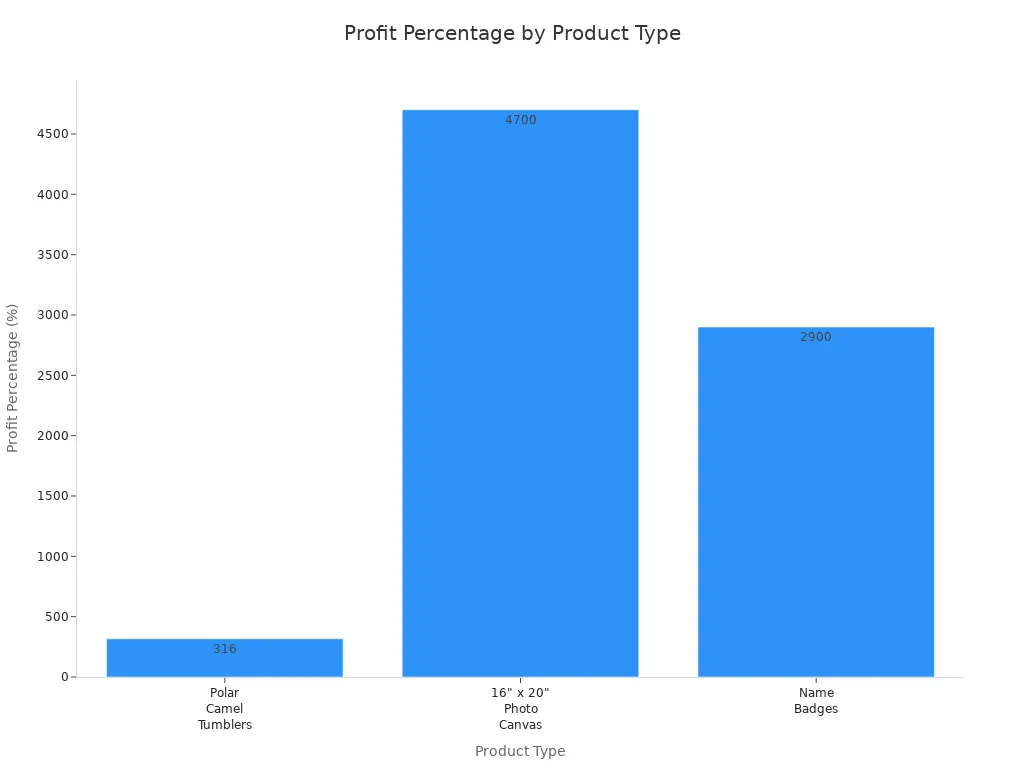
You can focus on products with high profit, like photo canvases or name badges. Printing just one yard sign a day can cover your daily machine cost. If you print tumblers, you can make enough in a few hours to pay for the whole month. UV printers let you take on more orders and keep your team busy.
Note: Personalized and small items are easy to ship and bring in more profit. You can scale up your business by picking the right products.
A UV printer is built to last. You get a machine that works for years with the right care. Here’s how you get the most value:
Clean and maintain your printer often. This keeps prints sharp and prevents problems.
Use the right ink and supplies. This protects your printer and keeps it running smoothly.
Take advantage of automatic cleaning and standby features. These help your printer last longer.
Choose a warranty that fits your needs. Extended coverage gives you peace of mind.
Focus on high-margin products and repeat customers. This helps you earn back your investment quickly.
You can break even in less than a year if you sell enough products. After that, your profits keep growing. UV printers give you flexible options, fast production, and strong returns for your business.
If you want a smart investment, a UV printer gives you speed, quality, and long-term value. You can build a business that lasts and grows with you.
A UV Printer gives you fast, colorful prints on almost any surface. You get sharp images, strong results, and lots of ways to use your creativity. Many businesses use this technology for signs, gifts, and packaging. If you want to make your own custom products, a UV Printer can help you stand out. Ready to try something new? Explore more and see how UV printing fits your needs!
You can print on wood, glass, metal, acrylic, plastic, vinyl, fabric, and even 3D objects. UV printers work on both flat and curved surfaces. You get bright, lasting prints on almost anything.
No, UV prints resist fading and scratches. The ink bonds tightly to the surface. Your prints stay bright and strong, even outdoors or with heavy use.
Yes! UV printers use LED lights and low-odor inks. You do not need to worry about strong smells or harmful fumes. Many people use them in offices, shops, or classrooms.
Absolutely! UV printers let you use white ink. You can print on dark or clear materials. White ink makes your colors pop and adds cool effects.
You should clean the print heads daily and check the ink. Run a test print before big jobs. Regular care keeps your printer running smoothly and your prints looking sharp.
Not at all. Most UV printers come with easy software. You can start with simple projects and learn as you go. Many people feel comfortable after just a few tries.
You can create signs, gifts, phone cases, awards, packaging, and more. Many businesses use UV printers for custom products. You can even start your own small business!
Tip: Try printing on different materials to see what you like best. You might discover a new favorite project!


