
Views: 0 Author: Site Editor Publish Time: 2026-02-09 Origin: Site


If you want to print on hard items or need bumpy finishes, a uv flatbed printer is a good choice. If you work with clothes or want quick custom prints, a UV DTF Printer is better. You should think about how good the prints look, how big they are, how fast it prints, how much ink costs, how easy it is to use, and if you can get help later. Many people also want a printer that can do many things, saves money, and has good customer service. This guide will help you pick the best printer for your business.
Pick a UV DTF printer if you want flexibility. It can print on many surfaces. It works well on curved items. This makes it great for custom jobs.
Choose a UV Flatbed printer for high-quality prints. It works best on flat surfaces. It gives strong and professional results. It is good for big projects.
Look at your budget before you decide. UV DTF printers cost less at first. UV Flatbed printers cost more to buy. But they might save money on materials later.
Think about how much you need to print. UV DTF printers are good for small batches. UV Flatbed printers are better for printing a lot at once.
Remember to check maintenance needs. UV DTF printers need cleaning often. UV Flatbed printers need care for print heads and UV lamps.
When you look at uv printers, you will see two main types: uv dtf printer and uv flatbed printer. Each one works in a different way and fits different needs. You should know how each printer operates before you decide which one to buy.
A uv dtf printer uses a two-step process. First, you print your design on a special film. Then, you transfer the design onto your item. This method does not use heat. You can use it on many surfaces, like fabric, plastic, wood, or metal. It works well for custom jobs and small batches.
A uv flatbed printer prints directly onto flat, hard items. You place your item on the printer bed, and the machine prints right on the surface. This method gives you strong, high-quality prints. It is best for large projects and items that need a smooth finish.
Tip: If you want to print on curved or flexible items, a uv dtf printer gives you more options. If you need fast, high-volume printing on flat objects, a uv flatbed printer is a better choice.
Here is a quick table to help you compare the main features of these two uv printing methods:
Feature | UV DTF Printer | UV Flatbed Printer |
|---|---|---|
Printing Process | Two-step with film transfer, no heat needed | Direct-to-object, no transfer step |
Material Compatibility | Works on fabric, plastic, wood, metal, and more | Best for flat, rigid materials |
Print Quality | Good, but less durable due to film layer | Excellent, direct bonding for strong results |
Production Speed | Slower, but can batch multiple designs | Faster for large runs |
Cost | Lower upfront cost, higher material costs | Higher upfront cost, lower ongoing costs |
Maintenance | Needs regular cleaning, film jams can happen | Needs head and UV lamp care |
This table gives you a clear view of the main differences. You can use it to match your needs with the right printer. If you want flexibility and lower starting costs, choose a uv dtf printer. If you want speed and top quality for flat items, go with a uv flatbed printer.
A uv dtf printer can make bright and strong prints on many things. This printer uses a special way to help your designs last longer and look better. Here is how it works:
The printer puts your design on a thin sticky film with UV-curable ink.
It uses piezoelectric inkjet technology to add the ink in layers. It starts with the color layer first.
Then, the printer adds a white ink layer. This makes your print stronger and more bendable.
After each layer, UV light dries the ink right away. This makes the print hard and tough to scratch.
Note: The UV ink dries as soon as it sees ultraviolet light. You do not have to bake or wait for it to dry. This saves time and lets you finish faster.
You can move the finished design from the film to your item. This way works well for custom jobs and small groups of items. You do not need heat, so you can print on things that might melt or change shape.
A uv dtf printer can be used for many projects. This printer lets you print on lots of materials and shapes. Here are some common ways people use it:
Custom gifts like mugs, phone cases, and keychains
Signs and displays like acrylic signs and PVC banners
Home and outdoor decor, such as wall art and furniture
Special gifts and souvenirs for events or tourists
Logos and labels on plastic, metal, and wood items
Custom designs on tiles and ceramics for home design
You can use dtf printing to make special products for your business or yourself. The uv dtf printer can print on curved, bendy, or bumpy things. You get great results without hard steps. This printer helps you make more products and meet more customer needs.
You can use a UV flatbed printer to print directly on many flat surfaces. This printer sprays UV ink right onto the top of your item. When the ink lands, a UV LED light shines on it. The light makes the ink dry and stick to the surface very fast. You do not have to wait for the ink to dry. This process helps you get sharp and bright images on many materials. You can print on wood, glass, metal, or plastic. The uv flatbed printer gives you strong prints that last a long time.
Tip: You can use this printer for both small and large items. You can also print on thick or thin objects without much setup.
You will find many ways to use a uv flatbed printer in your work or business. Here are some common uses:
Curtain printing lets you add bright and weather-resistant designs to many fabrics.
Furniture decoration printing helps you create custom looks for tables, cabinets, and more.
Art reproduction gives you high-quality copies of paintings with true colors and textures.
Tile and partition wall decoration allows you to print directly on ceramic tiles or glass for modern spaces.
Packaging box printing makes it easy to customize boxes quickly for special orders.
Advertising signage production helps you make clear signs for both indoor and outdoor use.
Personalized mobile phone case printing lets you offer unique designs in small batches.
You can use a uv flatbed printer for many creative and business projects. This printer helps you finish jobs faster and with less waste. You can meet many customer needs with just one machine.
You will notice clear differences in the workflow steps between these two types of printers. The uv dtf printer uses a multi-step process. First, you print your design onto a special film called film A. You use print glue, varnish, white ink, and CMYK inks in this step. Next, you cover the printed film with a transfer film, known as film B. Finally, you place the film onto your object and press it down. This process does not need heat, so you can use it on items that might melt or warp.
A uv flatbed printer uses a much simpler process. You place your item on the printer bed. The printer then prints your design directly onto the object. You do not need any transfer film or extra steps. The ink dries right away under UV light, so you can handle the item soon after printing.
Here is a table to help you compare the workflow steps:
Printer Type | Workflow Steps |
|---|---|
UV DTF Printer | 1. Print on film A (release paper) using print glue, varnish, white ink, and CMYK inks. |
UV Flatbed Printer | Direct-to-object printing, eliminating the need for transfer media, resulting in a simpler process. |
You will find that each printer offers a different experience when it comes to ease of use. The uv dtf printer gives you more flexibility. You can print on many shapes and surfaces, even curved or uneven ones. However, you must handle the film carefully and follow each step in order. This can take more time and practice, especially if you are new to dtf printing.
The uv flatbed printer makes the process easier for flat and rigid items. You only need to place your object on the bed and start the print. The printer does the rest. You do not need to worry about transfer films or extra steps. This makes it a good choice if you want fast results and less manual work.
Tip: If you want to print on many different shapes, choose a uv dtf printer. If you want a simple process for flat items, a uv flatbed printer will save you time.
A UV DTF printer can print on many surfaces. This works best for hard and smooth things. Here are some materials you can use:
Plastics: You can print on ABS and polycarbonate. If you want to use plastics like polypropylene or polyethylene, you must treat the surface first. These plastics are slippery, so ink does not stick well unless you treat them.
Metals: You get good results on aluminum and stainless steel. These metals are smooth, so your design lasts longer.
Glass and Ceramics: You can print on glass and ceramic if you clean them well. Sometimes, you can use a primer to help the ink stick better.
Textiles: This printer is not good for fabrics. The ink does not stay on soft or holey materials. For shirts or cloth, you should use regular DTF or sublimation printing.
Tip: Always check your item before you print. Clean and get it ready for the best results.
A UV flatbed printer lets you print on even more things. You can use it for both hard and soft items. Here are some common materials:
Rigid Materials: You can print on acrylic, metal sheets, glass, wood, and stone or ceramic tiles.
Flexible & Soft Materials: You can use PVC, leather, canvas, and paper.
Finished Products & Irregular Items: You can print on phone cases, USB drives, crafts, and coasters.
There are some limits. Bumpy surfaces can make printing harder. Items that are sensitive to heat or make fumes may not work well.
Note: Try to use flat and steady items for the best print. This helps you avoid problems when printing.
When you use a UV DTF printer, you get good print quality on many surfaces. The colors look bright and sharp. You can see small details in your designs. This printer works well for custom jobs and small batches. The film layer sits on top of your item, so the print feels a bit raised. You can touch the design and feel the texture.
The durability of UV DTF prints is strong for daily use. The UV ink dries fast and sticks well to most surfaces. You can wipe the print with a damp cloth, and it will not fade easily. However, the film layer can peel if you scratch it hard or bend the item too much. For items that get a lot of wear, you may see some edges lift over time.
Tip: If you want to keep your prints looking new, avoid sharp objects and do not bend the printed area.
A UV flatbed printer gives you excellent print quality. The ink bonds directly to the surface, so the colors look deep and rich. You can print high-resolution images with smooth gradients. The finish feels smooth and flat, with no extra film on top. This makes your products look professional.
You will notice great durability with UV flatbed prints. The ink cures under UV light and becomes part of the item. You can use these prints outdoors or in places with lots of sunlight. The colors stay bright for a long time. You can clean the surface without worrying about damage. Scratches and bumps do not affect the print as much as with film-based methods.
Note: For the best results, use flat and clean surfaces. This helps the ink stick better and last longer.
You need to think about how many items you want to make each day. Some printers work better for small jobs, while others shine in big projects. If you run a small shop or do custom work, you may not need the fastest machine. For large orders, speed matters more.
Here is a table that shows how different models perform:
Printer Model | Print Speed (sq ft/hr) | Ideal Use Case |
|---|---|---|
Model A | 50 | Small businesses, low volume |
Model B | 100 | Medium businesses, moderate volume |
Model C | 200 | High-volume production |
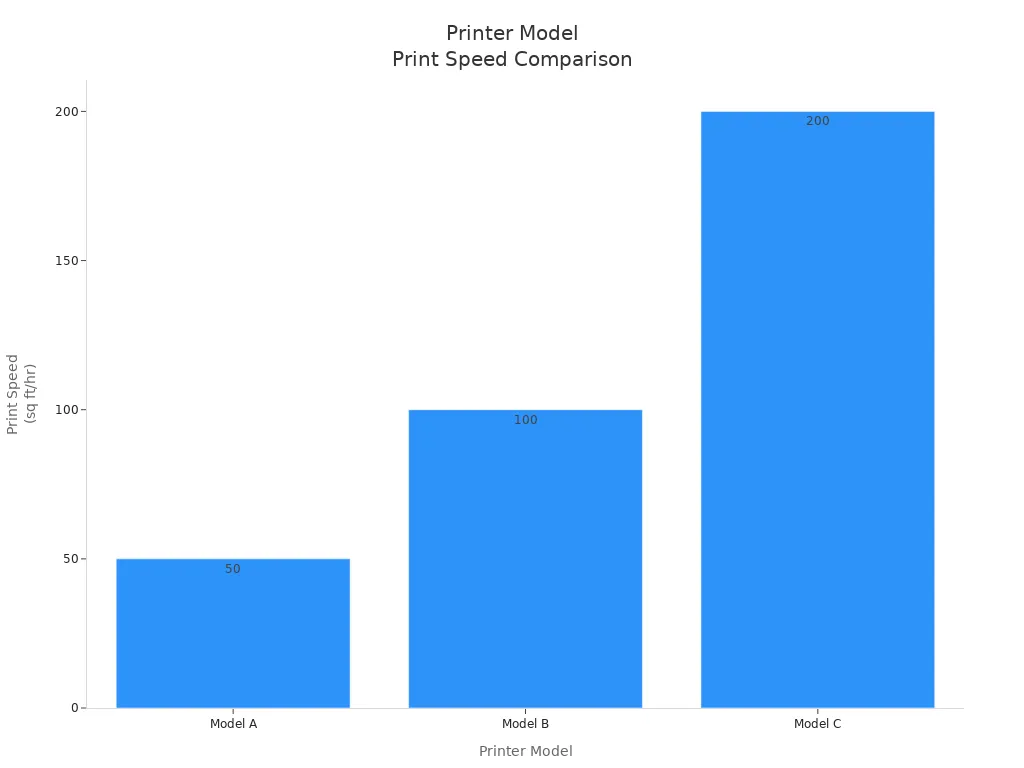
You can see that Model C works best for big jobs. Model A fits small batches or custom gifts. Model B gives you a balance if you want to grow your business.
You want your business to run smoothly. Efficiency helps you save time and money. Both uv dtf and flatbed printers offer features that boost efficiency:
You can print many items each hour. This helps you finish orders fast.
The machines work for long hours without stopping. You do not need to worry about breakdowns.
The ink dries right away. You can pack and ship products as soon as they come out.
You can use uv dtf printers on many surfaces. This gives you more choices for your products.
You get bright and strong prints without waiting for setup.
Fast production means you can fill orders right away.
The prints last a long time, even with washing or sunlight.
Tip: When you choose a printer, think about how efficiency will help your business grow. Fast and reliable machines let you serve more customers and keep them happy.
You need to think about the money you spend at the start. The price of a UV printer can surprise you. A UV flatbed printer usually costs more than a DTF printer. You pay more for the hardware and the advanced technology. If you want to start with less money, a DTF printer gives you a lower entry point.
Here is a simple table to show the difference:
Cost Element | UV Printer Cost | DTF Printer Cost |
|---|---|---|
Hardware | Higher upfront | Lower to mid upfront |
You see that the UV flatbed printer asks for a bigger investment. The DTF printer lets you begin with less money. You should pick the one that matches your budget and your business plan.
You also need to look at the money you spend each day. The operating cost includes ink, film, cleaning supplies, and power. A DTF printer uses special film and glue. These supplies can add up over time. You may spend more on materials for each print. A UV flatbed printer uses less film but may need more care for the print heads and UV lamps.
Here are some things that affect your daily cost:
Ink and supplies: DTF printing uses more film and glue. Flatbed printing uses more ink.
Maintenance: You clean both machines often. Flatbed printers need lamp and head checks.
Power: Both machines use UV lights, but flatbed printers may use more energy for bigger jobs.
Tip: Track your supply use and cleaning time. This helps you control your cost and keep your business strong.
You can save money by choosing the right supplies and keeping your printer clean. Always plan for both the first cost and the daily cost when you choose your machine.
There are many good and bad things about a UV DTF printer. You can use this printer to make custom designs on lots of surfaces. It works on flat, sloped, or curved items. The printing steps are easy, so you can finish jobs quickly. You can add varnish to make your prints shiny or not shiny. This helps your products look special. The transfer step is simple, so you can work faster.
Here are the main good things:
You can print on curved and sloped items for more choices.
You can pick shiny or plain finishes with varnish.
The steps are easy, so it is not hard to use.
The transfer step is quick, so you finish jobs fast.
There are also some bad things:
The printer costs a lot at first.
You have to clean and check the nozzles often.
You need more space for this printer than some others.
Note: Cleaning your printer often helps it work better and last longer.
You should also think about the good and bad sides of a UV flatbed printer. This printer makes strong and clear prints on flat things. You can use it on many materials, and the prints last a long time. The pictures look sharp and professional.
Here is a table with the main bad things:
Disadvantages of UV Flatbed Printers | Description |
|---|---|
High Price | These printers cost a lot to buy. This can be hard for small businesses or people. The price is between USD 3380 and USD 6380. |
Maintenance Issues | It can be hard to take care of the printer. The technology is new, and some brands are better than others. |
Slower Printing Speed | These printers are slower than regular ones. This can make it harder to finish lots of jobs fast. |
You can see that the high price and care needs are big things to think about. The slow speed can also be a problem if you have many jobs. You should think about these points before picking your printer.
Tip: If you want the best prints and work with flat things, a UV flatbed printer is a great pick.
Before you pick a printer, think about your business goals. Decide what you want to do with printing and custom work. If you sell custom clothes, you need a printer that works with many fabrics and designs. If you make items for branding, you want prints that look bright and last a long time. You should also think about how many orders you will get. Small shops often start with dtf printers because they cost less and are flexible. Bigger companies may need uv printers for faster work and better results. Check if your workspace is big enough for a uv flatbed printer, since it takes up more room.
Here is a table that shows which printer fits each business type:
Business Type | UV DTF Printer Application | UV Flatbed Printer Application |
|---|---|---|
Custom Apparel | Vibrant prints on many fabrics | Limited use, best for rigid substrates |
Promotional Items | Custom logos, graphics, and labels on merchandise | Direct printing on phone cases, plaques, awards |
Branding Efforts | Outdoor signage, personalized gifts | High-precision signage, packaging, industrial parts |
Tip: Write down your main business needs. This helps you find the best printer for your goals.
You can use dtf printers for lots of creative jobs. If you want to put logos on water bottles or phone cases, dtf printers work well. You can also brand jars, decorate candles, and make special gifts. Many small businesses use dtf printers for short runs and event items. Custom prints help your business stand out.
Here are some common dtf printer uses:
Custom logos on water bottles and tumblers
Branding on cosmetic jars and packaging
Graphics on phone cases and accessories
Decorative labels on candles and glassware
Personalized gifts and retail merchandise
Short run product labeling for small businesses
Promotional items for events and corporate marketing
If your business makes signs, a uv flatbed printer gives you more choices. You can print warning signs, safety signs, and advertising boards. Stores use uv printers for window graphics, billboards, and banners. You can also make nameplates, posters, and awards. Printing right on the item saves time and money.
Here are some common uv flatbed printer uses:
Warning & Safety Signs
Directional Signs
Indoor and Outdoor Signage
Event Signage
Advertising Boards
Window Graphics
Nameplates
Labels
Billboards
Banners
Posters
Merchandise
Plaques
Panels
Packaging
Awards
Most people use uv flatbed printers for making signs. These printers help make bright and strong signs for inside and outside. Stores often use them for window displays and banners. Printing on many materials makes work faster and cheaper. More people want uv printing for signs every year.
Note: Think about what you make most. Pick the printer that matches your main products and services.
You should plan your budget before you buy a printer. UV dtf and uv flatbed printers can cost from $20,000 to over $100,000. You also need to think about the cost of ink, materials, and repairs. UV inks cost more than regular inks, about 20-30% extra. Add these costs to your budget plan.
Small shops often pick dtf printers because they cost less at first. If you want to grow, you might need a uv flatbed printer for bigger jobs. You can look at ways to pay for your printer. Leasing lets you pay less at first and upgrade later. Equipment loans help you buy printers and tools. Working capital loans give you money for daily costs. Some leases have tax benefits and low payments. You can save cash for other needs and buy the printer at the end.
Here is a table with common ways to pay for your printer:
Financing Option | Description |
|---|---|
Leasing | Flexibility to upgrade and lower upfront costs |
Equipment Loans | Fixed-term loans for purchasing printers and equipment |
Working Capital Loans | Funds for operating expenses and business growth |
Tax Benefits | Lease payments may qualify as business expenses |
Low Monthly Payments | Helps you budget effectively |
Ownership Flexibility | Option to buy equipment at the end of the lease |
Preservation of Cash Flow | Keeps capital available for other expenses |
Tip: Check your budget and payment options. Choose the printer that fits your money plan and business goals.
You need to balance cost, how well the printer works, and what you want to make. Think about your business needs, what you will print, and your budget. This helps you choose the best printer and grow your business.
If you want to make many custom things, pick a UV DTF printer. It costs less to start and gives you more choices. If you need really good prints on flat, hard things, choose a UV flatbed printer. Before buying, talk to a supplier about how much you will print, what sizes you need, and what colors you want. Ask about any special things the printer can do. When you try a demo, look at how good the prints are. Check how fast it prints and if the software is simple to use. After you pick your printer, get your workspace ready. Buy the supplies you need and learn how to use the printer. This will help you start your business well.
You use a UV DTF printer for curved or flexible items. You use a UV Flatbed printer for flat, hard surfaces. The DTF method uses a film transfer. The Flatbed prints directly on the object.
Yes, you can print on glass or metal with both printers. You may need to clean or treat the surface first. This helps the ink stick better and last longer.
You will find UV DTF printers need more cleaning for films and nozzles. UV Flatbed printers need regular care for print heads and UV lamps. Both require routine checks, but DTF printers may need more frequent attention.
Need | Best Choice |
|---|---|
Custom, small items | |
Large, flat items | UV Flatbed Printer |
You should match your main products with the printer’s strengths.


