
Views: 0 Author: Site Editor Publish Time: 2026-07-05 Origin: Site


Upgrading to an A2 UV flatbed represents a significant capital expenditure for any growing business. For print shops and industrial manufacturers, the decision hinges not on flashy marketing campaigns. Instead, you must prioritize hardware reliability and verifiable output quality. The gap between entry-level desktop models and true industrial machines remains stark. Printhead longevity, ink viscosity management, and realistic material adhesion clearly define this gap. Buyers often face a difficult trade-off during procurement. They must choose between ultra-high resolution output and crippling daily maintenance overhead. We will carefully deconstruct the hardware specifications of an A2 UV system in this comprehensive guide. We focus heavily on high-resolution printhead capabilities. You will also review factual material compatibility matrices to understand true production limits. Finally, we outline strict criteria for selecting a reliable equipment partner. These actionable insights will help you avoid costly production downtimes.
Printhead configuration dictates ROI: High-resolution output requires matching picoliter drop sizes with specific UV ink viscosities to prevent premature clogging.
Material compatibility is conditional: While heavily marketed as "printing on anything," non-porous substrates (glass, metal) strictly require adhesion promoters (primers) for commercial durability.
Vetting the source matters: Partnering with an accountable uv printer manufacturer ensures access to OEM parts, ICC color profiling support, and technical SLAs, mitigating long-term downtime.
Defining the A2 sweet spot requires looking at standard production dimensions. An A2 print bed measures exactly 420mm x 594mm. This equals 16.5 x 23.4 inches of usable printable area. Standard A3 desktop models often restrict operators from printing multiple items simultaneously. Conversely, industrial large format UV flatbeds consume massive amounts of warehouse floor space. The A2 format solves this specific spatial challenge. It provides enough surface area for batch processing small items. Simultaneously, it easily accommodates medium-sized signage.
Success criteria in modern printing rely heavily on localized production. The A2 size proves ideal for medium-volume, high-margin jobs. Print shops use these machines for promotional items and custom packaging. Industrial manufacturers rely on them for printing precise dial plates. You achieve these high-value outputs without paying a severe floor-space penalty. Smaller facilities can easily integrate the machine into existing assembly lines.
Analyzing the cost-to-output ratio reveals clear production advantages. A true commercial UV printer in the A2 class bridges a critical manufacturing gap. It moves businesses away from slow prototyping. It establishes a highly efficient short-run manufacturing process. Operators can calculate a precise return on investment based on hourly throughput. Placing twenty phone cases on an A2 bed takes the same setup time as placing four on an A3 bed. This batching capability drastically reduces labor costs per unit.
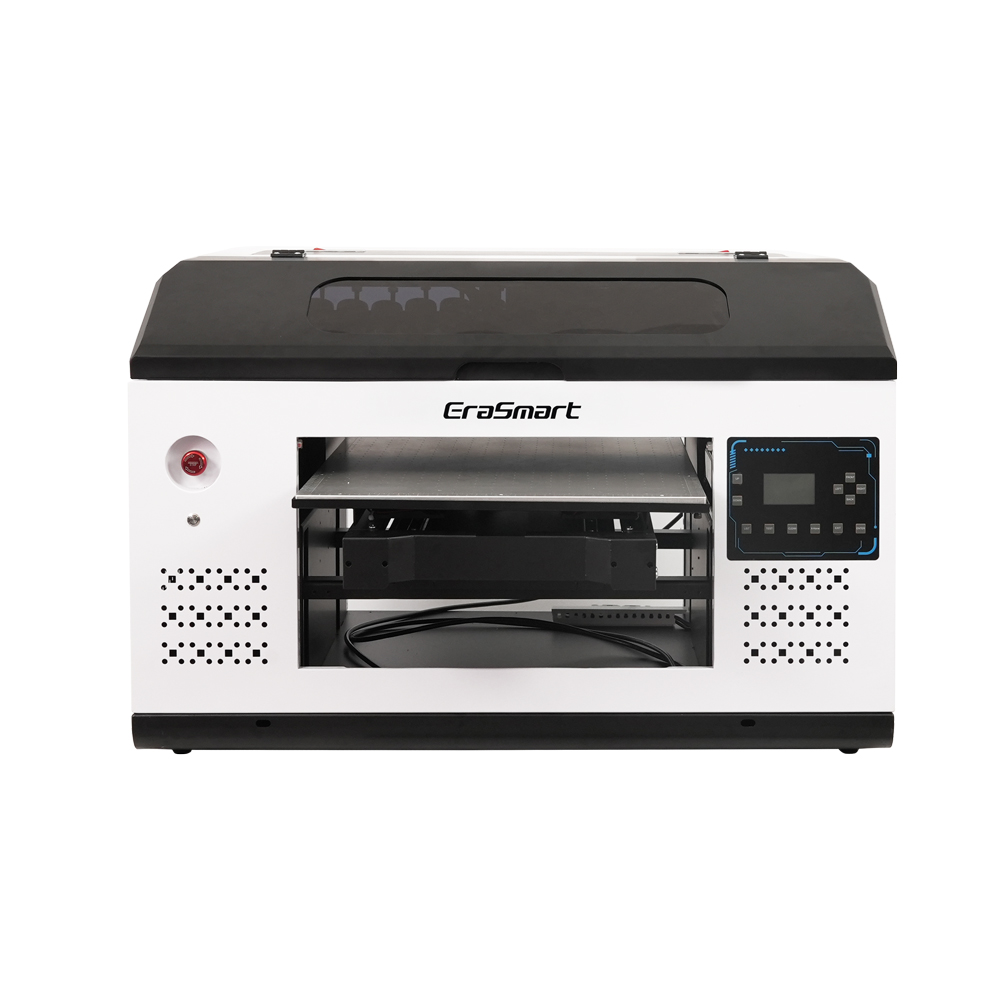
The mechanics of high-resolution printing depend entirely on fluid dynamics. Modern printheads utilize advanced variable dot technology. Manufacturers measure ink droplets in picoliters. Smaller drop sizes yield astonishing photographic quality. A printhead firing 2.5 to 3.5 picoliter drops creates flawless gradients. However, smaller nozzles demand pristine environmental controls. Dust or temperature fluctuations will instantly clog these microscopic openings.
Ink and printhead compatibility dictate machine lifespan. UV-curable inks contain complex chemical polymers. These polymers react aggressively to light and temperature shifts. A premium high resolution UV printer utilizes integrated white ink circulation systems. Titanium dioxide in white ink settles rapidly when left stagnant. Circulation prevents this heavy pigment from destroying the nozzles. Furthermore, localized heating elements maintain optimal viscosity directly at the nozzle. This ensures smooth droplet ejection.
Maintenance realities often surprise new machine operators. Common industry pain points include severe nozzle deflection. UV light reflection poses another massive threat. If curing lamps reflect off the substrate, ink cures directly on the printhead. Operators must rely on automated cleaning stations to prevent this. High-end A2 models feature automatic wiper blades and capping stations. They also include highly sensitive anti-crash sensor systems. These sensors instantly stop the carriage if it detects a material collision. Preventing physical head strikes saves thousands in replacement parts.
Marketing brochures frequently exaggerate material compatibility limits. The baseline capability of any multi material UV printer depends entirely on surface energy. Materials naturally repel or accept liquid based on their molecular tension. Understanding these categories prevents costly production failures.
Native adhesion requires absolutely no pre-treatment steps. Standard plastics like PVC, ABS, and acrylic fall into this category. Untreated wood and certain natural leathers also accept UV ink beautifully. However, you must implement strict ICC profiling. Different base colors drastically alter the final printed image. A custom ICC profile ensures optimal color accuracy across varied substrates. You cannot use the same color profile for white acrylic and dark oak.
Conditional adhesion strictly requires chemical intervention. Glass, ceramics, polished metals, and coated silicone naturally repel UV ink. Operators must apply adhesion promoters before printing. These primers chemically alter the substrate surface. The workflow involves cleaning the surface, applying the primer, and allowing evaporation time. Post-curing baking processes sometimes follow the printing stage. Baking permanently cross-links the ink polymers to the metal or glass.
Flexibility limits introduce another layer of complexity. Rigid UV inks offer supreme scratch resistance. They work perfectly on hard surfaces like metal and glass. Conversely, flexible UV inks contain specific elongation properties. You must use flexible inks for leather or TPU phone cases. Rigid ink will instantly crack and peel when the substrate bends. Operators should never purge lines to switch between rigid and flexible ink types. Mixing these chemistries inside the dampers often causes catastrophic clogs.
Material Compatibility and Adhesion Matrix | |||
Material Type | Adhesion Category | Primer Required? | Recommended Ink Type |
|---|---|---|---|
Acrylic / ABS Plastic | Native Adhesion | No | Rigid UV Ink |
Natural Wood | Native Adhesion | No | Rigid UV Ink |
Glass / Ceramics | Conditional Adhesion | Yes (Silane-based) | Rigid UV Ink |
Polished Metal | Conditional Adhesion | Yes (Acid-based) | Rigid UV Ink |
Leather / TPU Cases | Native Adhesion | No | Flexible UV Ink |
Adhesion failures remain the most common post-production complaint. Professionals use the ASTM cross-hatch adhesion test. They score the cured ink using a specialized blade. They apply aggressive tape and rip it off rapidly. If ink flakes off, the curing process failed. You must calibrate UV LED lamp intensity to match carriage speed. Fast carriage speeds require higher wattage settings. Slower passes allow for lower lamp intensity.
Z-Axis limitations heavily restrict certain industrial applications. An A2 UV printer typically offers maximum height clearances between 10cm and 20cm. Printing on taller objects introduces mechanical strain. A heavy object placed on the bed requires robust structural support. Dual-rail linear guides become absolute necessities here. Single-rail systems vibrate during carriage movement. This vibration causes visible horizontal banding on taller objects.
Environmental dependencies present unglamorous but vital workflow requirements. You must control humidity and temperature inside the print room. Dry air generates extreme static electricity on plastic substrates. Static deflects the microscopic ink droplets away from their target. This deflection causes blurry edges and ink overspray. Cold environments drastically increase ink viscosity. Thick ink starves the printhead dampers during high-speed printing.
Follow these standard calibration steps for every new material batch:
Clean the substrate surface using 99% isopropyl alcohol to remove finger oils.
Apply the manufacturer-recommended primer in a dust-free environment.
Print a small CMYK color grid using standard carriage speed settings.
Allow the ink to rest for 24 hours to achieve maximum polymer cross-linking.
Perform the cross-hatch tape test to verify commercial durability.
Evaluating vendor reliability extends far beyond the basic spec sheet. The origin of core components matters immensely. You must scrutinize how the factory integrates these parts. A branded chassis means nothing if internal wiring resembles a chaotic prototype. Proper integration ensures long-term stability.
Use a strict vendor evaluation checklist during your procurement phase. Hold sales representatives accountable for hardware origins.
OEM Supply Chain: Do they provide verifiable, un-coded printheads? Sourcing directly from major brands like Epson or Ricoh ensures authenticity. Encrypted or modified heads lock you into purchasing overpriced replacements from the vendor.
Post-Sale SLA: Demand a clear Service Level Agreement. Verify their availability for remote diagnostics. Ask about localized technician dispatch networks. Confirm guaranteed parts availability timelines.
Software Ecosystem: Insist on legitimate RIP software integrations. Genuine software provides accurate color mapping. Proprietary, locked-down slicers often limit your ability to import custom ICC profiles.
Vendor Evaluation Chart: Industry Standards vs. Red Flags | ||
Evaluation Metric | Reliable Standard | Severe Red Flag |
|---|---|---|
Printhead Transparency | Discloses exact model numbers | Obscures brand or lifespan data |
Sample Printing | Prints on your shipped materials | Only provides pre-printed samples |
RIP Software | Standardized (e.g., FlexiPrint, PhotoPrint) | In-house closed-source software |
Ink Supply | Open bulk system | Chipped cartridges forcing lock-in |
Avoiding red flags early prevents years of operational frustration. Walk away from vendors refusing to provide live sample printing. They must prove adhesion on your specific substrates. Never accept vague answers regarding printhead lifespan expectations. Accountability separates reliable partners from box-movers.
An A2 UV system serves as a highly robust production engine. However, you must accurately align printhead specifications with your target material workflows. Buying extreme resolution for printing on rough wood simply wastes capital. Conversely, using large-droplet heads for fine industrial dials yields unacceptable quality. Success relies equally on consistent operator training, material pre-treatment discipline, and underlying hardware quality. We highly encourage buyers to request custom sample prints. Ship your most challenging materials directly to the factory. Schedule a deep workflow consultation to evaluate operational efficiency before making your final hardware commitment.
A: Manufacturers measure printhead lifespan in billions of actuations. Under standard commercial use, a printhead typically lasts between 12 and 24 months. Proper daily maintenance dictates this timeline entirely. Consistent white ink circulation prevents heavy pigment settling. Regular automated wiping removes cured debris. Neglecting humidity control or skipping daily nozzle checks will destroy a brand-new head within weeks.
A: Yes, provided the manufacturer supports an integrated rotary attachment. You must check the maximum cylinder diameter the Z-axis clearance accommodates. Furthermore, verify the included RIP software capabilities. The software must include native rotary distortion compensation. This feature prevents images from stretching unevenly as the bottle or tumbler rotates during the printing process.
A: Rigid ink offers extremely high scratch resistance but remains brittle post-curing. It works perfectly for glass, metal, and acrylic. Flexible ink features lower scratch resistance but high elongation properties. You use it for leather, apparel, and soft plastics. We highly discourage purging ink lines to switch between them. Mixing these conflicting chemistries drastically increases printhead clogging risks.


