
Views: 0 Author: Site Editor Publish Time: 2026-10-15 Origin: Site


The promotional products market is shifting at incredible speed. Today, hard-surface, no-weed transfer printing dominates the customized goods industry. Small custom print shops face relentless equipment fatigue alongside significant capital risk. When you consider adding new machinery, you must balance tight footprint limitations against steep learning curves. You also need to ensure actual profitability before investing. Every new gadget promises endless revenue, but reality often looks quite different on the shop floor. We aim to cut through the heavy manufacturer hype.
This guide provides an unfiltered, financially-driven evaluation of this modern printing method. You will discover exactly whether adopting A3-sized technology makes operational sense for your business. We will explore revenue potential, technical limits, and daily maintenance realities. By the end, you can make a highly informed decision for your expanding print shop.
Ideal Use Case: Highly profitable for small businesses targeting hard substrates (glassware, metal, plastics) without the space for large flatbed printers.
Primary Hurdle: UV DTF technology demands strict daily maintenance to prevent printhead clogging; it is not a "plug-and-play, leave-it-for-a-week" machine.
Financial Reality: The initial hardware cost is secondary to the ongoing Total Cost of Ownership (TCO), which includes AB film, UV inks, and inevitable printhead replacements.
Form Factor Advantage: The A3 footprint is the sweet spot for home-based or retail-front businesses scaling up from craft cutters or sublimation.
Hard-surface customization constantly frustrates small print shops. Traditional sublimation demands specialized polymer coatings. You cannot sublimate onto standard glass or untreated metal. Adhesive vinyl requires painful, tedious weeding. This manual labor drains your profit margins rapidly. Modern transfer technology solves these core issues entirely. It eliminates weeding. It ignores substrate coatings. You simply peel and stick the design onto almost any solid item. This includes irregular shapes and curved surfaces.
Profit margin modeling reveals why this technology attracts so much attention. You must calculate the cost per sheet against your final retail value. A standard A3 sheet holds roughly 20 standard cup wraps. The combined cost of ink, A-film, and B-film averages around $2 to $3 per printed sheet. You can comfortably sell a single finished cup wrap for $3. Therefore, one sheet yields $60 in gross revenue. This represents a massive, highly scalable profit margin for a small business. If you run an A3 UV DTF Printer efficiently, the hardware pays for itself quickly.
Capacity considerations remain equally important. Manual vinyl application bottlenecks your production. Laser engraving restricts you to processing one item at a time. A dedicated transfer printer changes this workflow entirely. You achieve much higher output speeds compared to manual methods.
Consider this proven scaling approach for capacity management:
Print your gang sheets in bulk during morning hours.
Cut the printed sheets into individual decals.
Apply the decals manually during slower retail periods.
Fulfill diverse hard-goods orders without changing any equipment setups.
This workflow frees up expensive manual labor. You can build a small inventory of popular designs. You apply them only when an order arrives. This keeps your blank inventory flexible and your labor costs low.
Many new buyers confuse these three distinct printing methods. You must understand their differences to avoid costly mistakes. Standard Direct-to-Film (DTF) serves the apparel industry exclusively. It uses heat presses, liquid textile inks, and adhesive powder. The powder requires heat curing. Standard DTF fails completely on hard goods like glass or metal. It simply will not stick permanently.
Direct UV flatbed printing takes a different approach. Flatbeds print directly onto your items. You must place the physical object inside the machine. This requires significant height clearance. You also need custom jigs to hold items perfectly still. Flatbed printing processes items slowly, one by one. Check out a traditional UV DTF Printer (often categorized alongside flatbeds) to understand the workflow differences. Flatbeds struggle with extreme curves and odd shapes.
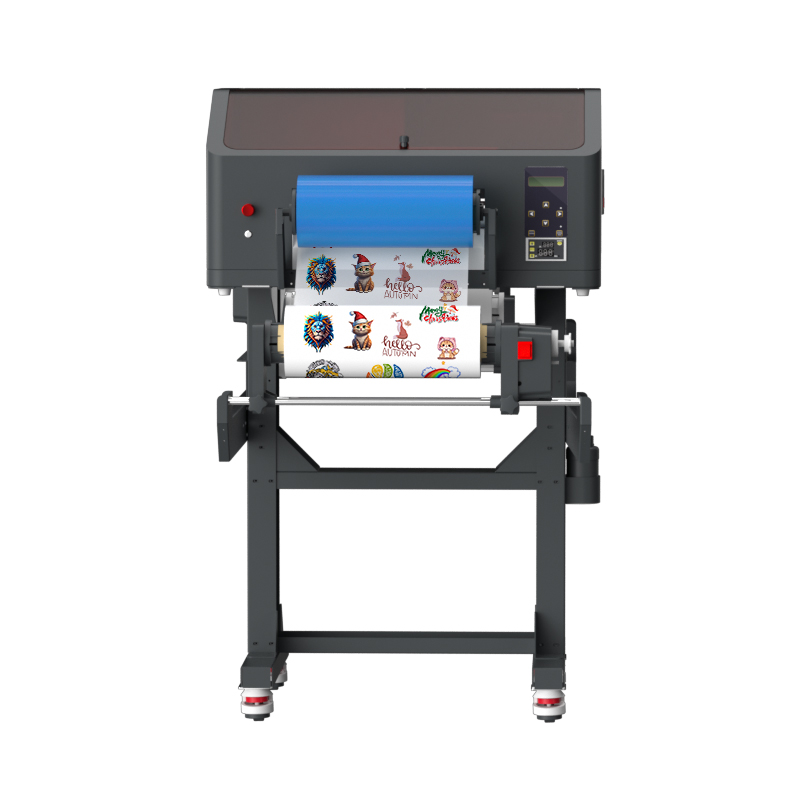
The transfer method bridges this gap perfectly. The machine prints onto a clear base layer known as A-film. It applies standard CMYK colors, white ink, and a top layer of varnish. A laminator then applies a carrier layer known as B-film. This process creates a pressure-sensitive, durable 3D decal. You peel off the backing and apply it like a heavy-duty sticker. No heat is required. The cold-peel nature makes it ideal for heat-sensitive plastics.
The A3 format matters deeply for small shops. Industrial roll-to-roll machines demand massive floor space. They often require dedicated 220V power circuits. The A3 footprint fits neatly on a standard workbench. It runs on standard household power. It provides the perfect balance between professional output and manageable size.
Technology Comparison Chart: Printing Methods
Feature | Standard DTF | Direct UV (Flatbed) | UV DTF Transfer |
|---|---|---|---|
Target Material | Apparel, Fabric | Flat Hard Goods | Curved/Irregular Hard Goods |
Application Method | Heat Press required | Directly printed on item | Pressure-sensitive cold peel |
Speed/Workflow | Fast batch printing | Slow, single-item focus | Fast batch printing |
Equipment Needs | Powder shaker, oven | Custom holding jigs | Film laminator |
You cannot treat this technology like a standard desktop paper printer. The biggest hurdle involves strict daily print requirements. The ink cures instantly under specialized lights. However, the liquid ink inside the lines dries out aggressively. It clogs delicate printheads easily. You must interact with the machine every single day. You need to print a test page or run a cleaning cycle daily. A reliable UV DTF Printer performs beautifully, but only if you respect its maintenance schedule.
White ink management causes the most headaches for beginners. White ink relies on heavy titanium dioxide pigments. These pigments settle rapidly at the bottom of the tank. If they settle in the lines, they create concrete-like clogs. Active white ink circulation is non-negotiable. You need built-in stirring systems to prevent pigment settling. Never buy a machine lacking an automated white ink management system.
Environmental and safety factors dictate where you can place the machine. The inks emit strong chemical odors before they cure. Proper room ventilation is mandatory. You cannot run these machines in an enclosed, windowless closet. Temperature and humidity directly impact your success. You must maintain an ambient temperature between 20°C and 25°C. Humidity should hover around 40% to 60%. Fluctuations cause the ink to behave poorly during lamination.
Your lamination workflow also requires careful planning. Many modern machines feature 2-in-1 designs. They include built-in laminators directly after the printhead. These save immense physical space. However, separate standalone laminating equipment offers distinct pros and cons.
2-in-1 Built-in Machines: Excellent space savers. Fully automated workflow. Harder to fix if the lamination tension breaks.
Standalone Laminators: Require extra desk space. Add a manual step to your workflow. Much easier to control film tension and prevent wrinkles.
Best Practice: Always perform a nozzle check every morning before printing real jobs. This 30-second task saves thousands of dollars in ruined materials.
Common Mistake: Ignoring humidity levels in winter months. Dry air causes severe static electricity, which ruins print clarity.
Choosing the right hardware dictates your operational success. Printhead configuration sits at the top of your buying criteria. You typically choose between Epson XP600 and i3200 printheads. The XP600 provides excellent value. It offers high resolution at a lower replacement cost. The i3200 prints noticeably faster. However, the i3200 costs significantly more to replace when clogs happen. For most small shops, the XP600 offers the safest entry point.
You must also evaluate head quantity. Dual-head setups handle basic CMYK and white ink duties. Triple-head setups add a dedicated printhead solely for varnish. A dedicated varnish head prints faster and creates a thicker, glossier 3D effect. Evaluate your budget against the need for extreme 3D textures.
Curing and lamination systems demand close inspection. Evaluate the quality of the LED curing lamps. Weak lamps leave the ink slightly tacky. Tacky ink fails to adhere properly to the B-film. The laminator tension consistency is equally vital. Poor roller tension causes "silvering." Silvering appears as tiny, ugly air bubbles trapped beneath the clear film. You want a heavy-duty roller system that applies smooth, relentless pressure.
Vendor support and warranty terms often outweigh the initial hardware specs. This machinery requires technical troubleshooting. Do not buy directly from overseas unless you possess strong mechanical skills. The critical importance of local tech support cannot be overstated. You need immediate availability of replacement parts like dampers and wipers. Proper RIP (Raster Image Processor) software training is vital. Your vendor should guide you through color profiles and ink limits. Consider consulting your vendor's A3 UV DTF Printer support documentation before purchasing.
Best Practice: Ask the vendor to print a sample file you provide. Inspect the varnish thickness and check for silvering bubbles before spending money.
Common Mistake: Buying based strictly on the cheapest hardware price while completely ignoring the quality of included RIP software.
Adding this equipment fundamentally upgrades your customization capabilities. However, it demands respect, discipline, and daily attention. The profit margins easily justify the effort for the right business model. You just need to ensure your order volume aligns with the maintenance requirements.
Shops with existing, verifiable demand for hard goods should invest now. If you currently sell tumblers, glassware, or promotional plastics, this technology will transform your workflow. It suits businesses already running daily production cycles.
Conversely, hobbyists should wait. Businesses with sporadic order volumes should avoid this hardware. If you lack the time for daily machine maintenance, do not buy it yet. We highly recommend outsourcing gang sheets to dedicated print houses first. Build your customer volume until the demand easily justifies the hardware commitment.
Here are your action-oriented next steps:
Audit your past six months of hard-surface orders to confirm your actual volume.
Dedicate a specific, climate-controlled workspace with active ventilation.
Establish a rigid daily maintenance schedule before the machine arrives.
Order pre-printed gang sheet samples from suppliers to test the application process yourself.
A: They offer excellent durability and strong water resistance. However, extreme heat and harsh commercial detergents degrade the adhesive slowly over time. Hand washing guarantees maximum longevity. Most commercial print shops label these items as hand-wash only. This safely manages customer expectations and prevents fading.
A: With impeccable daily maintenance, printheads generally last between six and twelve months. Irregular cleaning or leaving the machine idle drastically shortens this lifespan. Budget for annual printhead replacements as a standard operational necessity. Consider printheads as consumable items, not permanent hardware.
A: No heat press is required. The technology creates a pressure-sensitive decal. You apply it manually using firm friction from a squeegee. The cold-peel process eliminates the need for specialized heating equipment. This makes it perfect for heat-sensitive plastics and irregular shapes.
A: Expect to spend roughly 10 to 15 minutes daily. This brief window covers morning nozzle checks, quick test prints, and end-of-day capping procedures. This rigid routine prevents catastrophic ink clogs and ensures consistent print quality. Never skip this daily step.


