
Views: 0 Author: Site Editor Publish Time: 2026-04-21 Origin: Site


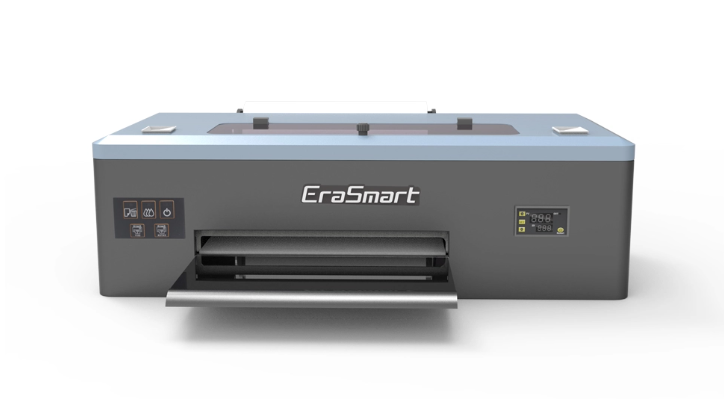
You want to find the right machine for your business. Start with a clear guide that helps you measure your budget, workspace, and order size. Many new owners look for a desktop DTF printer that fits their budget and space. A user-friendly option like the EraSmart printer gives you a simple start with dtf printing. Use this business guide to pick the best tool for your goals. Let this guide help you choose and grow.
Begin your t-shirt business with an A4 DTF printer. This saves you money and space. It works well for small orders and home use.
Watch how many orders you get and what sizes you print. If you say no to big jobs often, think about getting a bigger printer. A bigger printer helps you work faster.
Pick a printer that is easy to use, like EraSmart. Simple controls make printing easier. This lets you spend more time growing your business.
Always check your costs. A4 printers cost less to buy. But they might stop your business from getting bigger. Getting an A3 or larger printer lets you make more shirts.
Take care of your printer. Clean it often and store your supplies the right way. This keeps your printer working well and your prints looking nice.
It is important to make good choices when you start a t-shirt business. Entry-level dtf printers help you get started. Many small business owners pick a desktop dtf printer. These printers fit in small spaces and do not cost too much. You can put a compact printer like EraSmart at home or in a small shop. This helps you begin your business without spending a lot.
Here is a table that explains why entry-level dtf printers are a top pick for new businesses:
Reason | Description |
|---|---|
Cost-effectiveness | Entry-level dtf printers let you print short runs for less money. |
Versatility | You can use them on many materials and sell more products. |
Quick turnaround times | These printers help you finish orders fast and keep customers happy. |
High-quality prints | Dtf printing gives you bright colors and sharp details on shirts. |
Eco-friendly options | Many entry-level dtf printers have eco-friendly features for a greener business. |
User-friendly interface | Simple controls make these printers easy for anyone to use. |
Entry-level dtf printers give you good results for less money. They help you save money and grow your business slowly.
Entry-level dtf printers are best for small orders and short runs. You can use them to print logos, custom designs, and test samples. These printers are great for home businesses or small spaces. Their small size means you do not need a big workshop.
Here are the main ways people use A4 entry-level dtf printers:
You can print small or medium t-shirt orders.
Entry-level dtf printers can print full-color and detailed designs.
The prints last a long time, even after many washes.
You can finish orders quickly and deliver them fast.
Entry-level dtf printers are small and cheap, so they are good for new businesses.
If you want a good entry-level dtf printer for your first t-shirt business, pick one that is small and does not cost much. These printers help you start small and save money. You can build a good name for your business. When your business gets bigger, you can buy a larger printer. For now, entry-level dtf printers give you what you need to do well.
If you pick an A4 desktop dtf printer like EraSmart, you get a small machine. It fits in tight spaces. The print area is about 8.3 by 11.7 inches. This size is good for small designs and logos. You can make custom prints easily. Bigger printers like A3 have more space. They measure about 11.7 by 16.5 inches. You can print larger designs or more small prints at once.
Printer Size | Print Area (inches) |
|---|---|
A4 | 8.3 x 11.7 |
A3 | 11.7 x 16.5 |
An A4 dtf printer can print 30 to 60 square feet each hour. This speed works well for small businesses. You can handle small orders or custom pieces. Some advanced printers print over 100 square feet per hour. These are usually bigger machines. DTF printing lets you make many designs at the same time. You can print more shirts per hour than DTG printers. DTG printers usually print 10 to 20 shirts per hour. DTF printers can do more.
Starting with an A4 desktop dtf printer costs less money. The price is lower than bigger printers. This is good for new businesses or home use. You use less ink and film for each design. This keeps your costs down. If you buy a bigger printer, you can earn more profit.
Printer Type | Initial Cost | Ink and Film Usage | Profit Potential |
|---|---|---|---|
A4 | Lower | Less per design | Lower |
A3 | Higher | More per print | Higher |
EraSmart printers are easy to take care of. They have an automatic white ink system. This stops ink from clogging. You spend less time cleaning. The printer also cleans itself. This keeps the printhead working well. These features help you print more and keep quality high.
If your business gets bigger, you may see some limits. The A4 printer has a small print area. You cannot print big designs or many items at once. If you get large orders, the printer may be too slow.
Using an A4 printer a lot means you must watch your costs. Ink cartridges cost $300 to $500 per set. Monthly costs for supplies and maintenance are $1,000 to $2,000. You need a workspace with good air flow. You also need a curing oven and storage for materials.
Cost Type | Estimated Cost Range |
|---|---|
Replacement Ink Cartridges | $300 - $500 per set |
Monthly Operating Costs | $1,000 - $2,000 |
Other problems include:
More maintenance as you print more
Keeping enough ink, film, and supplies
Making sure prints look good when you are busy
If you want to print bigger designs or more products, you should get a larger dtf printer. The EraSmart desktop dtf printer is a good start. Knowing when to upgrade helps your business grow.
Tip: Watch your order numbers and print sizes. If you wait for prints or say no to big jobs, it is time to get a bigger printer.
Your orders may start to get bigger. This means you should think about getting a new desktop dtf printer. If you get more requests for big prints or lots of shirts, your current printer may not work fast enough. Many small businesses switch from A4 to A3 or bigger dedicated a4/a3 desktop dtf printers when they need more choices and faster printing.
Here are some reasons to get a bigger printer:
You want to print big pictures on t-shirts or hoodies.
You need to print many small designs at once to save time.
You get orders for full-size shirts or items that an A4 printer cannot print.
A4 printers are good for small designs like logos and tags. If you want your business to grow, look at A3 or A2 printers. These printers help you do more orders and give your customers more choices.
Tip: Keep track of your order sizes and print requests. If you say no to jobs because of print size, it is time to upgrade.
Your business may get bigger and run into problems. These problems can slow you down and make customers unhappy. Dedicated a4/a3 desktop dtf printers can help you avoid these problems. They work better and have more features.
Here is a table of common workflow problems with A4 printers:
Issue | Description |
|---|---|
Clogged print heads | Prints may look streaky or not finished. This lowers the quality of your designs. |
Ink Adhesion Problems | Prints may peel or crack after you use them. |
Film Jamming | Jams can stop printing and hurt your printer. |
Color Inconsistencies | Colors may not look even. This makes prints look bad. |
Poor Washability | Prints may fade or break after washing. This can upset customers. |
Errors can stop printing and cause delays. | |
Overheating | Using the printer too much can damage it and lower print quality. |
Software Issues | Glitches can slow printing, especially with old software. |
Ink Leakage | Leaks can waste materials and make your workspace messy. |
If you see these problems a lot, you need a better printer. Getting a bigger model like EraSmart can help you keep up with orders and make good prints every time.
When your business grows, you need tools that grow with you. Upgrading your dtf printer gives you many benefits. You can save money, use new features, and print more shirts. This helps you get more customers and do bigger jobs.
Benefit | Explanation |
|---|---|
Cost Savings | Trade-in programs can help you save money by giving you credit for your old printer. |
Access to Advanced Technology | New printers have features that make printing faster and better. |
Increased Production Capacity | Bigger printers can handle more orders and help you finish jobs on time. |
EraSmart has good printers for every step of your business. You can start with a desktop dtf printer and upgrade to a bigger dedicated a4/a3 desktop dtf printers when you see these signs. If you want printer ideas, look for models that fit your order size and printing needs. You can also ask other business owners or experts for advice. Picking the right printer makes your business stronger and ready to grow.
Note: Always check printer ideas before you upgrade. The right printer helps you make good prints and keeps your customers happy.
When you upgrade from an A4 desktop dtf printer to an A3 or larger model, you unlock new possibilities. Larger dtf printers give you more space for printing. You can create bigger designs and print more shirts at once. This means you finish orders faster and take on more jobs.
Here is a table that shows how productivity increases as you move to bigger printers:
Printer Size | Output (Shirts per Hour) | Notes |
|---|---|---|
A4 | 6–8 | Max output due to smaller print size and frequent sheet changes |
A3 | 15–18 | Nearly double the output, ideal for small to medium shops |
A2 | Higher than A3 | Requires more space and higher costs, suitable for oversized prints |
For home studios or small shops, A3 printers work well. You can print on T-shirts, kids’ clothes, bags, pillows, hats, and socks. Larger print areas let you make complex designs and combine many small prints on one sheet. This saves time and money.
You need to think about cost and space before you buy the best dtf printer for your shop. Bigger printers cost more at first, but they help you earn more as your business grows. Here is a table that compares the costs:
Feature | A3 DTF Printer | A4 DTF Printer | 24”+ Large DTF |
|---|---|---|---|
Initial Investment | $3,000–$8,000 | $1,500–$3,000 | $8,000+ |
Cost/Print | $0.50–$2.50 | $0.30–$1.50 | $0.25–$1.00 |
Ideal Volume | 50–500/month | Under 100/month | 500+/month |
You also need more room for a larger dtf printer. Make sure you have space for the machine, supplies, and a safe work area. Plan for a heat press, curing unit, and good air flow.
Upgrading to the best dtf printer can change your business. You can offer more products and serve more customers. The custom T-shirt market keeps growing. New dtf technology lets you print on more materials and make better items.
Evidence Type | Description |
|---|---|
Market Growth | The custom T-shirt market is growing fast with more online sales. |
Technological Advancements | New dtf printers work with more fabrics and give better results. |
Business Strategy | Shops with the best dtf printer and automation stay ahead of the competition. |
Tip: When you upgrade, get tools like a heat press, shaker, RIP software, and good storage. These help you use your new printer well and keep your shop running smoothly.
Picking the right desktop DTF printer helps your business grow. You should know how A4, A3, and bigger printers are different. Each size has its own features and good points. The table below shows how EraSmart A4 and A3 models are not the same.
Feature | EraSmart A3 DTF Printer | EraSmart A4 DTF Oven |
|---|---|---|
User-Friendliness | Intuitive interface, automated ink systems | N/A |
Print Quality | High-quality prints with 1440dpi resolution | N/A |
Suitable for | Small to medium-sized businesses | Small and medium-sized print jobs |
Curing Features | N/A | Precise temperature control, air purification |
Maintenance | Auto cleaning feature | Easy maintenance with slide-out filter |
Design | N/A | Compact design, customizable color options |
The A3 printer has more advanced features than the A4. It is easy to use because of its smart controls and ink system. The A3 model makes sharp prints with 1440dpi. If you have a small or medium business, the A3 might be the best choice.
The A4 model is good for smaller jobs. It is small and easy to keep clean. You can pick different colors to match your room. The A4 oven lets you control the heat and keeps the air clean. This helps your prints look nice.
Tip: Think about how many orders you get and how much space you have. A3 printers are better for bigger businesses. A4 printers are good for home or small shops.
If you want to make more products or get more orders, think about getting a bigger printer. This can help you keep up with what your customers want and help your business grow.
You can pick an A4 desktop DTF printer like EraSmart if you want to spend less money, set up fast, and do small jobs. When your business gets bigger, you should get a larger printer. Bigger printers work faster and can print larger designs. Think about these things:
How big the printer is and if it fits your space
How many prints you need and how good they look
If the printer is simple to use and clean
If it saves you money
Business Stage | Best Choice |
|---|---|
Startup or Home Business | EraSmart A4 Desktop DTF Printer |
Growing or High-Volume Shop | Upgrade to A3 or larger DTF Printer |
Tip: Check how many orders you get and what you want for your business. Try out new designs, keep your printer in good shape, and store your supplies the right way to help your business grow.
You can print on cotton, polyester, blends, and even leather. This gives you many options for t-shirts, hoodies, bags, and more.
You need a small table or desk. The printer fits in a home office or small shop. Make sure you have room for supplies and a heat press.
You should follow the printer’s cleaning schedule. The automatic cleaning system helps, but you should check the printhead and ink system every week for best results.
You can use it for small or medium orders. For large orders, you may need a bigger printer. This helps you finish jobs faster and print larger designs.
Most printers come with their own software. You can use design programs like Photoshop or CorelDRAW to create your artwork. Then, send your design to the printer’s software for printing.


