
Views: 0 Author: Site Editor Publish Time: 2026-04-28 Origin: Site


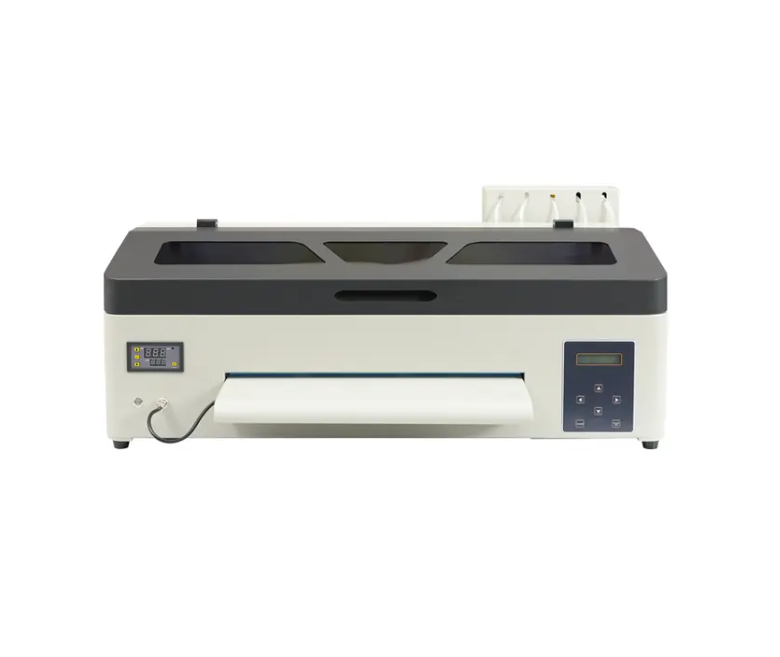
If you want a good dtf printer for small t-shirt jobs, you should look at the EraSmart ERA-A3 Max-DTF models. These machines make dtf printing simple for new users and small clothing shops. You get high print quality without paying a lot of money. The small size fits well in your home workspace. You can print dtf designs on cotton, polyester, blends, and nylon for custom shirts. Many people like the easy-to-use design and the low cost to start. Here are some reasons people choose EraSmart for dtf:
Reason | Description |
|---|---|
User-Friendly Design | Easy controls help new workers learn fast. |
Low Entry Barrier | Costs much less than big DTF or DTG machines. |
Versatile Output | Prints on cotton, polyester, blends, and nylon. |
Compact Size | Fits in home work areas or shared maker rooms. |
If you only need a few shirts, you can use dtf transfers and a heat press before getting a full printer.
Pick the EraSmart A3 DTF printer if you want good quality and a fair price. It is small and easy to use.
Check important things like print width, ink system, and how much care the printer needs when you pick a DTF printer for small jobs.
Keep your work area neat and clean. This helps you get great prints and makes work easier.
Clean the print heads often and check the ink levels. Doing this stops problems and makes your printer last longer.
Join online groups to get help and advice about DTF printing. You can learn a lot from other people and get better at printing.
When you start with dtf printing, you want a setup that fits your needs and budget. Not every dtf printer works well for small jobs. You should look for features that make your work easier and help you get great results without spending too much.
Here are the most important things to check when picking a dtf printer for low-volume use:
Print Width Capacity
The print width tells you the biggest design you can make. If you plan to print large graphics, you need a printer with a bigger print area. For most custom t-shirts, an A3 size (about 11.7 x 16.5 inches) works well. It gives you enough space for adult shirt designs but keeps the machine compact.
Ink System and Ink Type
Good dtf printers use special inks that stick to many fabrics. White ink is key for bright colors, especially on dark shirts. Some printers have a white ink circulation system. This keeps the ink from clogging and helps you get better quality prints.
Print Speed and Production Output
You want a printer that matches your pace. If you only print a few shirts each week, you do not need the fastest machine. Still, a steady print speed helps you finish jobs on time.
Media and Fabric Compatibility
The best dtf printers work with many types of film and powder. This means you can print on cotton, polyester, blends, and even nylon. You get more options for your custom shirts.
Software and RIP Compatibility
Good software helps you control colors and print settings. Look for printers that work with popular RIP software. This makes it easier to get the colors and details you want.
Maintenance Requirements
Low maintenance means less downtime. Choose a dtf printer that is easy to clean and keep running. This saves you money and time.
Build Quality and Components
A sturdy printer lasts longer and gives you more reliable results. Check for solid parts and a good warranty.
Tip:
If you want to compare dtf printing with other methods, look at the costs. DTF printers for low-volume use cost much less than DTG or screen printing setups. You can start with a basic configuration for as little as $500 to $1,500. This makes dtf printing a smart choice for beginners.
Here’s a quick look at how printer size affects your setup:
Printer Size | Maximum Printable Area (inches) | Suitability for Small-Scale T-Shirt Printing |
|---|---|---|
A1 | 23.39 x 33.11 | Best for high output and commercial scenarios |
A2 | 16.54 x 23.39 | Balanced for small to medium-sized studios |
A3 | 11.69 x 16.54 | Ideal for personal customization and small jobs |
For most home businesses, an A3 dtf printer gives you the right mix of size and flexibility. You can handle most t-shirt printing jobs without taking up too much space.
You want your shirts to look sharp and last long. That means you need a dtf printer that delivers professional-grade print quality every time. DTF printing stands out for its bold, solid graphics. The white ink base makes colors pop, even on dark shirts. You may not get the ultra-fine detail of some DTG printers, but you will see crisp edges and strong contrast in your designs.
To keep your prints looking great, you need to follow a simple maintenance routine. Here are some daily and weekly tasks that help your dtf printer stay in top shape:
Maintenance Task | Benefits |
|---|---|
Daily maintenance | Prevents clogging and keeps print quality consistent. |
Cleaning print heads and components | Stops ink buildup and keeps prints sharp. |
Regular checks on print head status | Helps you catch problems early and avoid wasted film. |
Scheduled maintenance | Reduces breakdowns and keeps your printer running longer. |
Cleaning to prevent contamination | Keeps your workspace clean and your prints free from dust. |
Optimized ink usage | Saves money and keeps colors bright. |
Color consistency maintenance | Makes sure every shirt looks the same. |
Prevention of print defects | Stops streaks and banding for a polished finish. |
Extended printer lifespan | Protects your investment and lowers repair costs. |
Cost savings through preventative care | Regular care costs less than big repairs. |
You should also:
Wipe down the printing platform and remove dust before each job.
Print a test strip to check the print head before and after printing.
Watch for any changes in print quality and fix them right away.
With the right dtf printer and a little care, you can enjoy high-quality prints and a smooth workflow. This makes dtf printing a great choice for anyone starting out in t-shirt printing or looking to grow a small business.
When you want to pick the best dtf printer for your t-shirt printing, you have a few great options from EraSmart. Each model fits different needs, so you can find one that matches your space, budget, and how many shirts you want to print.
You might like the EraSmart A3 DTF Printer if you want high quality printing and a compact size. This dtf printer gives you 1440 dpi resolution, which means your designs look sharp and colorful. The XP600 printhead helps you get smooth color blends and bright whites. You can use this printer for cotton, polyester, and blends. Many small businesses and hobbyists choose this model because it is easy to use and does not take up much space. The price sits between $2,000 and $3,000. You get a white ink circulation system, so you spend less time on maintenance and more time making shirts. This feature helps you keep your print quality high and your workflow smooth.
If you want to start small, the EraSmart A4 DTF Printer or Mini DTF Printer could be perfect. These models fit on a desk and do not need much room. They are easy to set up and use, which is great if you are new to dtf. You get direct factory pricing, so you save money. EraSmart gives you free one-on-one online training, so you learn how to use your dtf printer quickly. You also get a one-year warranty and lifetime support. These printers work well for personal studios and first-time startups who want to try custom garment printing without a big investment.
Model | Key Features | Ideal For |
|---|---|---|
EraSmart A3 DTF Printer | 1440 dpi, compact, user-friendly, white ink system | Startups, small businesses |
EraSmart A4 DTF Printer | Smallest size, easy to use, low cost | Beginners, personal studios |
EraSmart A3 Pro | Dual print heads, higher output | Growing businesses, more volume |
If you need to print more shirts or want to grow your business, you might look at the EraSmart Roll DTF Film Printer. This dtf printer can handle more transfers each day. Desktop models like the MiniJet print up to 15 sheets per hour, which works well for home-based startups. If you need even more, mid-range units can print up to 30 sheets per hour and have semi-automated powder application. These printers help you keep up with bigger orders and still get high quality dtf prints.
Here’s a quick look at the main advantages and disadvantages of the most popular EraSmart dtf printer models for low-volume custom garment printing:
Model | Advantages | Disadvantages |
|---|---|---|
A1 | Huge print area, high quality & detail, high capacity | High price, large size, harder to learn |
A2 | Good size, compact, fair price | Not for very large prints, moderate cost |
A3 | Space-saving, affordable, great for custom projects | Smaller print area, less versatile |
Tip: If you want a high-quality dtf printer for custom t-shirt printing, the EraSmart A3 DTF Printer (XP600 Printhead) gives you the best mix of price, print quality, and ease of use. You can start small and upgrade as your business grows.
When you set up for DTF printing, you want to make sure you have all the right tools. A complete setup helps you get the best printing quality and makes custom garment printing easy. Here’s a quick look at what you need:
Equipment/Supply | Description |
|---|---|
Key for producing vibrant, durable prints; must be compatible with DTF inks. | |
PET Film | Essential for the transfer process; used with the printer. |
DTF Inks | Special water-based pigment inks for bright, long-lasting prints. |
Hot Melt Powder | Used with the heat press for strong, soft transfers. |
Sets the prints for durability and wash resistance. | |
Powder Mixer | Helps you prepare the hot melt powder for even application. |
Heat Press | Transfers your design to the shirt with heat and pressure. |
You need a high-quality dtf printer to start. This machine gives you the color and detail you want for t-shirt printing. PET film works with your printer to hold your design before you transfer it. The film lets you see every detail and keeps your print quality high. If you want to try dtf without buying a printer, you can order dtf transfers and use a heat press at home. This is a smart way to test dtf printing before you invest in a full setup.
DTF printing uses special inks that work on cotton, polyester, and blends. These inks keep your colors bright and your prints soft. Hot melt powder helps your design stick to the shirt and gives a smooth finish. You need a curing oven to set the powder and make your prints last. A powder mixer makes it easy to get even coverage, which helps with quality and durability.
Tip: DTF printing does not need pre-treatment. You save time and get great results on many types of shirts.
A good heat press is important for dtf printing. Look for one with even pressure and steady heat. You want a machine with an adjustable pressure knob and a digital timer. This helps you get the same results every time. For most shirts, a 16x20 inch platen works well. You can pick a clamshell, swing-away, or drawer style, depending on your space and workflow.
You need software to create and print your designs. Most people use programs like Adobe Illustrator, Photoshop, or CorelDRAW for artwork. For printing, you need RIP software such as AcroRip or Cadlink Digital Factory. These tools help you control color, white ink, and print quality for the best results in customization and garment printing.
If you want to start small, just order dtf transfers and use a heat press. This way, you can try custom t-shirt printing without buying a full setup. DTF printing gives you flexibility and quality on many types of shirts.
You want your dtf printing area to be clean, safe, and organized. Pick a spot away from busy parts of your home, like a spare room or garage. Make sure you have a sturdy, heat-resistant table for your dtf printer and heat press. Keep your workspace dust-free and well-ventilated. Open windows or use a fan to help with air quality. Store your supplies in labeled bins or on shelves so you can find everything fast. A tidy space helps you work better and keeps your prints looking sharp.
Choose a quiet, low-traffic area.
Use a sturdy table for all your equipment.
Keep the area clean and dust-free.
Make sure you have good airflow.
Organize tools and supplies within reach.
Setting up your dtf printer configuration is easy if you follow a few steps. Place your printer on a flat surface. Plug it in and load the PET film. Use the software to set your print resolution. For most t-shirt printing, 1440 DPI gives you the best quality. Set your print speed to medium for a balance of speed and detail. Adjust the white ink settings so your colors look bright, especially on dark shirts. Always print a test strip before starting a big job. This helps you catch problems early.
Place your printer and connect it.
Load PET film and check ink levels.
Set print resolution to 1440 DPI.
Use medium print speed for best results.
Adjust white ink for strong color.
Print a test strip to check quality.
Start by making your design in a program like Photoshop. For adult shirts, size your design between 10.5 and 12 inches wide. Print your design onto the PET film. Sprinkle hot melt powder over the wet ink. Shake off the extra powder. Cure the print in the oven so the powder melts and sticks. Place the film on your shirt and use the heat press. Set the press to 320°F for 15 seconds. Peel off the film when it cools. Now you have a custom shirt with great quality and bright colors.
Tip: Always let your print cool before peeling the film. This keeps the design crisp.
Keep your dtf printer running well with simple care. Clean the print heads every day to stop clogs. Wipe down your workspace to keep dust away. If you see streaks or faded colors, run a cleaning cycle. If the transfer film does not stick, check your heat press settings. Use the table below for quick fixes:
Issue | Solution |
|---|---|
Clogged Print Heads | Run cleaning cycles, clean by hand, do regular maintenance. |
Poor Adhesion of Transfer Film | Adjust heat press temperature, check pressure, pre-treat fabric if needed. |
Ink Smudging or Smearing | Let prints dry, check ink settings, use good transfer film. |
Software Issues | Update software, use the right file format, check printer connections. |
With the right configuration and care, dtf printing gives you top quality and easy customization for your t-shirt printing projects.
When you start with dtf printing, you want to know how much money you need. The good news is you can begin with a small setup for t-shirt printing without breaking the bank. Here’s a simple table to show what you might spend at first:
Item | Cost Range |
|---|---|
Basic DTF printer | $3,000 - $6,000 |
Heat press | $500 - $1,500 |
Initial supplies (films, inks, powder) | $500 - $1,000 |
Computer and design software | $1,000 - $1,500 |
You also need to think about ongoing costs. These include things you use up, like dtf films, inks, and powder. You will also pay for things like electricity, insurance, and marketing. Here’s what you might spend each month:
Item | Cost Range |
|---|---|
DTF films | $0.50 - $2.00 per sq ft |
Ink sets | $150 - $400 per set |
Adhesive powder | $25 - $50 per pound |
Utilities | $200 - $500 monthly |
Insurance | $100 - $300 monthly |
Marketing | $200 - $1,000 monthly |
You can keep costs low by starting with small-volume orders. Buy supplies in small amounts until you get more customers. Dtf printing lets you control your spending and grow at your own pace.
You do not need a huge space for dtf printing. Most people use a spare room, basement, or even a garage. Before you buy anything, measure your space. Make sure you have room for your dtf printer, a heat press, and a spot for powdering and curing.
DTF printers range from compact desktop units to much larger industrial machines. Before you buy, get out a tape measure and map out your workspace. You don't just need room for the printer; you also need space for your powdering and curing station, a heat press, and some elbow room to work.
you can often repurpose a garage or spare room for your heat press, printer, and curing area.
A small setup for dtf printing fits on two sturdy tables. Keep your supplies close by for easy access. Good airflow helps keep your prints looking sharp and keeps you comfortable while you work. With a little planning, you can run a quality custom t-shirt printing business from almost anywhere.
When you buy a dtf printer, you want to know that help is there if you need it. EraSmart gives you strong support for your dtf printing journey. You get a 1-year warranty that covers the whole machine. This includes important parts like print heads, the motherboard, and even UV lamps. If something goes wrong, you do not have to worry about big repair bills.
You also get lifetime technical support. You can reach out for help using WhatsApp, email, or even remote desktop. Most of the time, you will get a reply within 2 hours. This fast response helps you fix problems quickly and get back to dtf printing. Here’s what you can expect:
1-year warranty for the entire dtf printer, including key parts.
Lifetime technical support through WhatsApp, email, or remote desktop.
Fast response time—usually within 2 hours.
Tip: Save your support contact info in your phone or computer. You never know when you might need quick help with your dtf setup.
You do not have to figure out dtf printing alone. Many people share their tips and tricks online. These communities help you learn new skills, solve problems, and stay up to date with the latest dtf news. You can ask questions, share your own dtf printing results, or just read what others have posted.
Some places to find help and connect with other dtf fans:
Facebook groups for dtf printing beginners and pros.
Reddit forums where users talk about dtf printing issues and solutions.
YouTube channels with step-by-step dtf tutorials.
Online forums that focus on dtf and custom t-shirt printing.
If you join these groups, you will find answers to common dtf questions and make friends who love dtf printing as much as you do. You can learn a lot from others who have been where you are now.
You want a setup that is simple and does not cost much. The EraSmart dtf printer is the best choice for printing a few t-shirts. It works well and does not need a lot of money to start. This helps new users and small shops begin quickly. If you are not sure, you can use dtf transfers and a heat press first. You can buy a printer later if you want to do more. For extra help, join dtf groups online. You will get tips, learn what works best, and get advice from people who like dtf printing.
Get help with fixing problems
Learn smart ways to print
Find out about tools and supplies
Hear stories and tips from others
You clean your DTF printer by wiping the print heads daily and running a cleaning cycle. Keep dust away from your workspace. If you see streaks, use the printer’s maintenance tools.
You can print on cotton, polyester, blends, and nylon. DTF works on most shirts. Always check the fabric label before you start.
For adult shirts, designs between 10.5 and 12 inches wide look great. Kids’ shirts need smaller designs. Try a test print to see what fits.
You need design software like Photoshop or Illustrator. For printing, use RIP software. This helps you control colors and print quality.
You can start with a small setup. Buy a DTF printer, heat press, and supplies. Costs stay low if you print just a few shirts each week.


