
Views: 0 Author: Site Editor Publish Time: 2026-04-14 Origin: Site


A DTF printer lets you make bright designs on shirts. The designs have many colors and last a long time. You get prints that look professional on almost any clothing. This helps your dtf printing business stand out. DTF printing is growing fast with a 29.49% growth rate. By 2024, it makes up 44.5% of all digital transfer printer setups. People like dtf because it works fast and makes bright colors. You can pick entry-level, mid-range, or high-end dtf printers. This depends on what you need. This technology helps you grow your custom shirt business. You get professional prints and good results.
DTF printing gives bright and strong designs on many fabrics. This makes it great for custom shirt businesses.
The DTF printing process starts with printing on PET film. Then, you put on adhesive powder. Next, you cure it. After that, you use heat pressing to make the transfer last a long time.
Pick a DTF printer by looking at print quality, speed, and how much it can grow with your business. This helps your business needs and growth.
Think about the total cost, like supplies and fixing, when picking a DTF printer.
Look up brands and read reviews. This helps you pick a good DTF printer with helpful customer support.
You might wonder what makes a DTF printer special. This printer lets you print designs on shirts using a unique process. You start by printing your artwork onto a PET film. The film holds the ink and adhesive without bleeding. You use CMYK inks for bright colors. White ink acts as a base for dark fabrics. After printing, you apply adhesive powder. This powder helps the design stick to the fabric. You cure the powder with a curing oven. Then, you use a heat press to transfer the design from the film to the shirt.
Let’s break down the main parts of a DTF printer and what they do:
Component | Function |
|---|---|
PET Films | Used to print designs; holds ink and adhesive without bleeding. |
CMYK Inks | Provides bright colors; white ink serves as a base for dark fabrics. |
Adhesive Powders | Helps the design adhere to the fabric; varies for different fabric types. |
Heat Press | Transfers the design from film to fabric. |
Curing Oven | Cures the adhesive powder on the film. |
Automatic Powder Shaker | Distributes adhesive powder evenly on the film. |
Manual Shaker | Suitable for small-scale operations. |
Film Rollers | Assists in handling and storing PET films. |
Cutting Tools | Used to trim printed films. |
You also need RIP software for color management. This software helps you get the best colors for your designs. The DTF printer uses hot melt adhesive powder to bind the ink to the fabric. You can use an automatic powder shaker for even powder application. If you run a small shop, a manual shaker works fine.
Tip: Always check if your DTF printer comes with all these parts. Missing one can slow down your printing process.
You have many ways to print designs on shirts. DTF printing stands out for several reasons. Let’s see how it compares to other methods like DTG printing.
Feature | DTF Printing | DTG Printing |
|---|---|---|
Cost Efficiency | More cost-efficient for large designs | Better for smaller-volume projects |
Production Speed | Shorter cycles, but slower than DTG | Edges out DTF in speed |
Material Compatibility | Best for synthetic and blended fabrics | Best for natural materials like cotton |
Printing Volume | More efficient for larger orders | Less scalable due to pre-treatment |
Color Application | Excels at printing white ink | Advantage in achieving a wide spectrum of colors |
Longevity | Maintains color longer with proper curing | Durable but less vibrant on dark fabrics |
Eco-Friendliness | More eco-friendly than traditional methods | More eco-friendly than traditional methods |
DTF printing works well for synthetic and blended fabrics. You get vibrant colors and strong designs. DTG printing is better for cotton shirts. It works faster but may not last as long on dark fabrics. DTF printing is more cost-efficient for big orders. You can scale your business easily. You also use less pre-treatment, which saves time.
Note: If you want to print large, colorful designs on many shirts, a DTF printer gives you the best results. You can handle bigger orders and offer more fabric choices.
DTF printing uses a special process. You print on film, add adhesive powder, cure it, and then press it onto the shirt. Other methods, like screen printing, require more steps and setup. DTF printing lets you create detailed designs with less hassle. You can print small batches or large runs without changing your setup.
You get a flexible printer that fits many needs. DTF printing helps you grow your business and offer high-quality shirts to your customers.
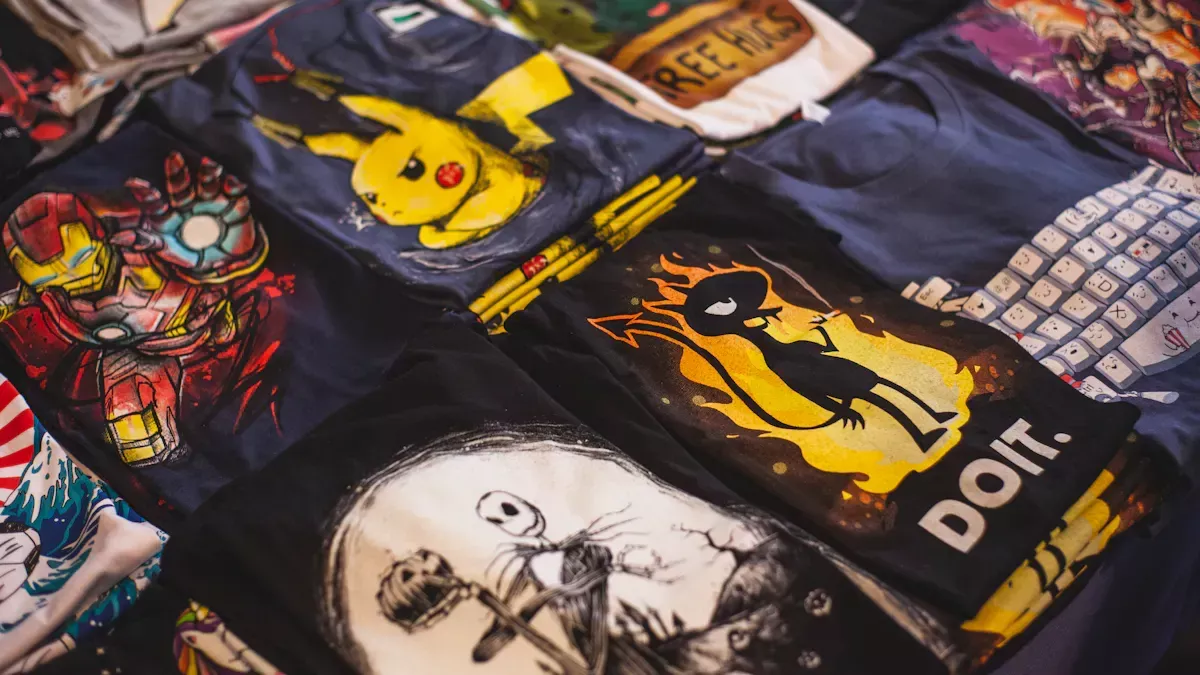
You might wonder how dtf printing actually works for shirts. The process is simple once you break it down. Here’s what you do:
File Preparation: You start by creating your design in graphic software. Then, you upload it to the DTF RIP software.
Printing on Film: The printer prints your design onto a special PET film. It uses CMYK colors and a thick layer of white ink.
Applying Adhesive Powder: While the ink is still wet, you sprinkle hot-melt adhesive powder over the film.
Curing: You heat the film so the powder melts and forms a glue layer.
Heat Pressing: Place the cured film on your shirt and press it with a heat press for about 10 seconds.
Peeling: Let the film cool, then peel it off to reveal your finished design.
This process lets you create bright, durable transfers for all kinds of shirts. You can use dtf printing for both small batches and large orders.
Tip: Always let the film cool before peeling. This helps your transfers stick better and last longer.
You need the right supplies to get the best results from your dtf printer. Here’s a quick look at what you’ll use and how much it might cost per shirt:
Supply Type | Cost per T-Shirt |
|---|---|
DTF Printer Ink | $0.60 - $1.00 |
DTF Printing Film | $0.30 - $0.50 |
DTF TPU Powder | $0.10 - $0.20 |
You’ll also need a powder shaker or dryer, an air purifier for safety, and a heat press. Don’t forget the RIP software for color control.
When you make dtf transfers, size matters. Check out these recommended transfer sizes for different shirt types and placements:
Garment Size | Placement | Recommended Size | Notes |
|---|---|---|---|
Infant | Front | 5" x 6" | Fits smaller areas without overwhelming. |
Youth (S–M) | Front | 8" x 10" | Perfect for balanced design placement. |
Adult (S–M) | Front | 10" x 12" | Standard size for most adult garments. |
Adult (2XL+) | Back | 14" x 16" | Bold, visible design for larger sizes. |
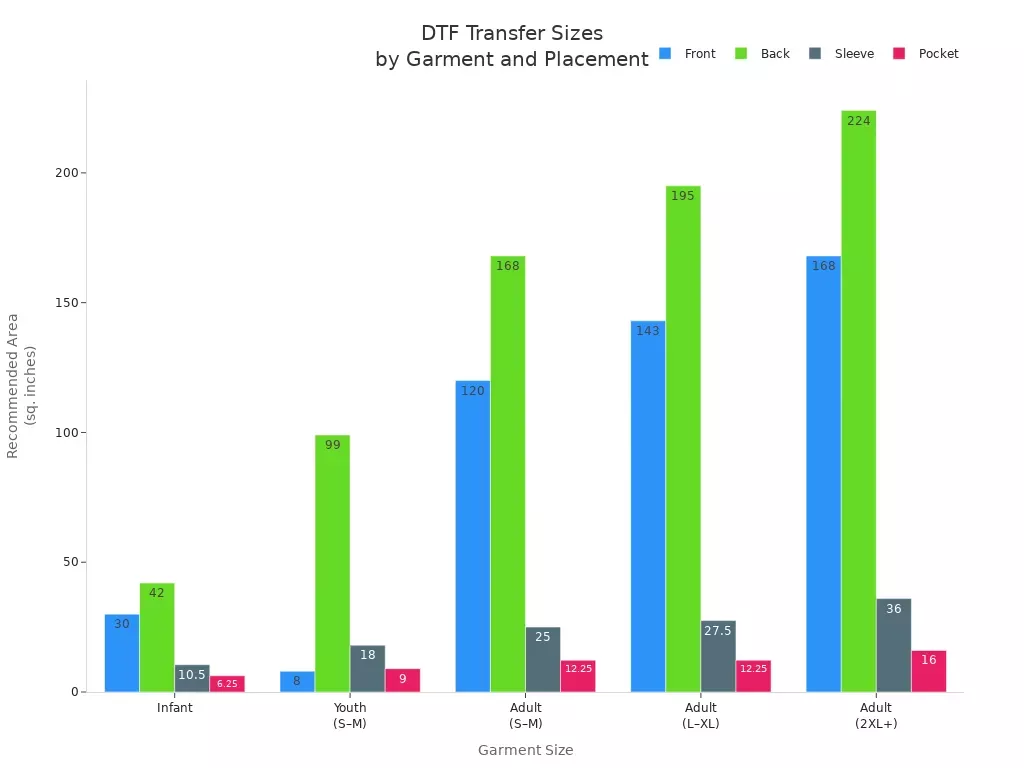
Note: Using the right size for your dtf transfers makes your printing look professional and helps your designs stand out.
When you use a dtf printer for shirts, you get some big benefits. This method stands out because it gives you bright, long-lasting designs. You can print on many types of fabric, not just cotton. That means you can offer more choices to your customers. You also skip the pre-treatment step, which saves you time and effort.
Here’s a quick look at what makes dtf printing a great choice:
Advantage | Description |
|---|---|
Vibrant Prints | You get high-quality prints with accurate, bold colors. |
Fabric Versatility | Works on cotton, polyester, blends, and more. |
Durability | Prints stay sharp and colorful even after many washes. |
Soft Finish | Transfers feel soft and stretch with the fabric. |
No Pre-Treatment Required | You can print faster and with less hassle. |
Performance on Dark Fabrics | DTF works well on dark shirts and tricky materials. |
Tip: If you want to offer custom shirts with lots of color and detail, a dtf printer helps you deliver results that wow your customers.
Even though dtf printing has many strengths, you should know about its limits. For very large orders, screen printing often costs less. Dtf cannot create special effects like puff or metallic finishes. If you want those, you need a different method.
Here are some common drawbacks:
The upfront cost for a dtf printer and supplies can be high.
You may find it tricky to handle the hot melt adhesive powder.
Dtf transfers leave a layer on the fabric, which feels different from screen printing.
Wash durability usually reaches 50-100 cycles, while top screen prints last even longer.
Printing on non-traditional materials can be tough.
Limitation | Description |
|---|---|
Initial Investment Cost | Buying a dtf printer and accessories costs a lot at first. |
Maintenance and Technical Issues | Managing powder and keeping the printer running takes effort. |
Limitations in Specialty Effects | Dtf cannot do puff, metallic, or textured effects like screen printing can. |
Note: Think about your business needs before you choose dtf. If you want to print huge batches or need special finishes, you might want to look at other options.
Picking the right dtf printer can seem hard at first. You can make it easier by thinking about a few main things. You want your shirts to look great and stand out. Let’s talk about what is most important.
Print quality should be the first thing you check. You want your designs to look bright and clear on every shirt. Dtf printers make sharp prints on many fabrics, even dark ones. You do not need to pretreat dark shirts with dtf. This saves you time and work. DTG printers need pretreatment for dark shirts to look good.
Here’s a quick comparison:
Feature | DTF Printing | DTG Printing |
|---|---|---|
Fabric Compatibility | Works on various fabrics, including dark materials | Best on 100% cotton, requires pretreatment for dark fabrics |
Durability | Very durable, vibrant colors, flexible | High-quality but may fade on untreated fabrics |
Print Quality | High-quality prints on a range of materials | Excellent on cotton but less versatile |
Dtf gives you pro-level prints, even on tough fabrics. Always ask to see finished samples before you buy. This lets you check the print quality yourself.
Dtf printing does not need pretreatment for dark shirts.
DTG printing needs pretreatment for dark shirts to look good.
Think about how big your designs will be. The right dtf printer should print both small and large designs. Most dtf printers can print big sizes like 22" x 24" or 24" x 36". This means you can print large back graphics or small front logos.
You can grow your business with a printer that prints bigger sizes.
Bigger print areas let you take more types of jobs.
If you want your shop to grow, pick a dtf printer that can keep up.
Speed is important if you have lots of orders. You want a dtf printer that works fast. Print speed depends on how many printheads the printer has. A 2-head printer can print about 25-35 feet each hour. A 4-head printer can print 50-60 feet per hour.
Here’s a quick look at how speed affects your production:
Metric | 2-Head DTF Printer | 4-Head DTF Printer |
|---|---|---|
Linear Feet per Hour | 25-35 ft | 50-60 ft |
A3 Transfers per Hour | 40-50 | 80-100 |
8-Hour Shift Shirt Output | ~200 shirts | ~400 shirts |
A faster printer lets you finish more jobs quickly. This helps you meet deadlines and take bigger orders. Dtf printers also use less power than old printing ways, so you save money over time.
Tip: Ask if the vendor has printers ready and if they help move the printer to your shop.
Taking care of your dtf printer keeps it working well. You should clean the printheads and check for clogs often. Look for printers with automatic cleaning and easy-to-reach parts. These features make cleaning easier and save time.
Regular cleaning is needed for good prints.
Pick a printer with features that cut down on manual work, like auto cleaning.
Plan for ink, powder, and spare parts so you are not surprised by costs.
Watch for signs you need an upgrade, like slow speed or clogs.
A printer that is easy to upgrade will grow with your shop. You will not need to buy a new one every year.
Cost is a big thing when buying a dtf printer. Prices can go from $2,000 to $4,500, depending on brand and features. Do not just look at the price. Check what support and warranty you get. Good support can save you time and money if something breaks. Look for:
Warranty that covers important parts
Tech support by phone or email
Spare parts you can get easily
Online guides and help
You want a warranty that covers the main parts and gives you peace of mind. Ask if the vendor helps with moving and setting up the printer. Some vendors help with setup, which makes things easier.
Note: Always ask for finished samples, check if printers are in stock, and confirm if the vendor helps move the printer before you buy. This helps you avoid problems and get the best dtf printer for your shop.
You might wonder how a dtf printer stacks up against DTG printers. Both can make great custom shirts, but they work in different ways. DTF does not need pre-treatment, so you save time. You also spend less on ink and supplies. Here’s a quick look at how they compare:
Factor | DTF Printing | DTG Printing |
|---|---|---|
Ink & Consumables | Lower | Higher |
Pre-treatment Needed | No | Yes |
Average Print Cost | $0.50–$1.00 | $1.00–$2.00 |
DTF prints last a long time. They stay bright and do not crack or fade after many washes. DTG prints can lose color over time, especially after lots of washing. You can use a dtf printer on almost any fabric, like cotton, polyester, fleece, or blends. DTG works best on cotton. If you want to print on many types of fabric, dtf gives you more options. DTF printers also cost less than most DTG printers, so you can start your business with less money.
Screen printing has been around for a long time. Many big brands use it for huge orders. If you want to print a lot of shirts, screen printing is fast and makes thick, strong designs. DTF works better for small or medium orders. You can set up a dtf printer quickly and change designs without much work.
Feature | DTF | Screen Printing |
|---|---|---|
Durability | Less durable, can wear with washing | More durable, resists abrasion |
Production Volume | Faster for small to medium runs | Best for large-scale jobs |
DTF uses less water and makes less waste than screen printing. You do not need to wash screens or throw away extra ink. DTF printing also uses less energy, which is better for the planet.
Tip: If you want to print many designs or need fast changes, a dtf printer is a smart choice.
Sublimation printing is another way to decorate shirts. It works best on white polyester. You cannot use it on cotton or dark fabrics. DTF printing lets you print on cotton, polyester, blends, and even dark colors. You get bright colors with dtf, but the print has a slight texture. Sublimation gives you sharp detail and smooth prints, but only on light polyester.
Feature | DTF Printing | Sublimation Printing |
|---|---|---|
Material Compatibility | Cotton, polyester, blends, darks | Light polyester or special surfaces |
Color Vibrancy | Bright, with some texture | Sharp and vibrant on white polyester |
If you want to offer more choices to your customers, a dtf printer gives you the most flexibility. You can print on almost any shirt and get great results.
You want to pick a dtf printer that fits your business goals. Start by thinking about the size of your shop and how many shirts you plan to print. If you run a small custom apparel business, you might not need a huge printer. Make sure you check your workspace. Measure the area so your printer fits without crowding your apparel setup. Look at your budget. Decide how much you can spend on printing equipment and supplies. Some printers cost more but offer faster printing or better quality. Ask yourself if you need high-resolution prints or just basic designs.
Tip: Make a list of must-have features before you start shopping. This helps you avoid buying a printer that does not fit your needs.
You should always research brands before buying a dtf printer. Look for companies with good reviews and happy customers. Read what other apparel shops say about their printers. Brands with strong support and warranties make your printing experience smoother. Customer support matters when you run into problems. Reliable brands offer easy access to spare parts and help with setup.
Print quality and speed matter most.
Ink compatibility and software integration help you get the best results.
Future-proofing your investment means picking a printer that supports upgrades.
Many buyers make mistakes when choosing a dtf printer. You can avoid these by paying attention to a few key points:
Don’t overlook maintenance. Clean your printer often to keep prints sharp.
Make sure your printer works with the materials you use for shirts.
Don’t underestimate the total cost. Include supplies, repairs, and upgrades.
Store your film flat and in a cool, dry place to prevent warping.
Test print settings for each material to get consistent results.
Use proper curing techniques and monitor temperature for durable prints.
Note: Smart workflow habits, like keeping a checklist, help you avoid mistakes and keep your printing process smooth.
If you want a reliable model, check out the FlexLine DTF600 MK-II. This printer prints up to 2400×720 dpi and handles 3-4 A4 sheets per minute. It has built-in white ink recirculation and a strong metal frame for durability.
Feature | Description |
|---|---|
Print Quality | Prints up to 2400×720 dpi for sharp images. |
Speed | Prints 100 square feet per hour. |
Usability | Built-in white ink recirculation for easy maintenance. |
Durability | Metal frame boosts durability by 30%. |
You get a printer that keeps up with your custom apparel business and delivers great results for shirts.
When you choose a dtf printer for shirts, you get bright, long-lasting designs that work on many fabrics. Remember to check film quality, adhesive strength, and transfer size for the best results. Think about your business needs, print volume, and space before you buy. A high-quality dtf printer gives you better prints, saves money, and keeps your customers happy. Take your time, compare your options, and ask questions. You can build a custom shirt business that stands out!
DTF prints can last through 50–100 washes if you follow care instructions. You get bright colors and strong designs that stay sharp. Always wash shirts inside out and use cold water for best results.
You can print on cotton, polyester, blends, and even dark fabrics. DTF works on most shirt materials. Just make sure the fabric is clean and flat before pressing your design.
Yes, you need RIP software. This software helps you manage colors and print settings. It makes sure your designs look bright and accurate on every shirt.
DTF printing is safe if you follow safety tips. Use an air purifier and wear gloves when handling powder. Keep your workspace clean and well-ventilated.
You should clean the printheads often and check for clogs. Use the printer’s auto-clean feature if it has one. Regular care keeps your prints looking sharp and your printer running smoothly.


